


Zoom ups webinar cap to 1 million attendees

Zoom has raised the webinar attendee limit to one million users to enable large-scale events on the video meeting platform.
Zoom has proved an effective fundraising and voter engagement tool for Democratic political groups in the run-up to the 2024 US presidential election, with several celebrity-led events held in support of candidate Kamala Harris pushing the limits of the app.
One call, targeting white women, was so popular that it exceeded Zoom’s pre-existing 100,000 attendee cap, prompting the vendor to raise the limit to 200,000 on a temporary basis. Another three-hour event held last month, “White Dudes for Harris,” was even more popular, with almost 200,000 attendees, according to reports, raising over $4 million.
On Monday, Zoom announced that it has officially raised the webinar limit to 1 million attendees for all customers. Event organizers can now select the intended size of an event, with a cap of 10k, 50k, 100k, 250k, 500k, and 1m attendees, the company said in a press release. Webinars can last up to 30 hours and feature up to 1,000 “interactive” video panelists.
Zoom made no specific reference to the Democratic political group fundraisers in the press release. It said that it envisages a range of uses for such large-scale, one-off events, including massive internal corporate “all-hands” meetings, celebrity-hosted events such as fan “meet and greets,” brand product launches, and crisis communications for government agencies.
“Now event organizers have the flexibility and power to host truly interactive experiences on an unprecedented scale and the ability to purchase large single-use webinars,” said Smita Hashim, chief product officer at Zoom.
Holding such large events isn’t cheap, however, with reports that a webinar with 1 million attendees will cost around $100,000.
Zoom also stated that webinars that last longer than three hours may require “additional paid consulting services” from its Event Services team.
Source:: Computer World

TSMC’s first chip factory in Europe gets €5B state aid from Germany
Watch: rocket explodes during test for UK’s first vertical launch
How To Block Someone On Snapchat?
CMF Phone 1 Review: The Almost Perfect Budget Smartphone
Robot coaches are reading brain signals to support stroke rehabilitation
IDC: Expect AI spending to more than double to $632B
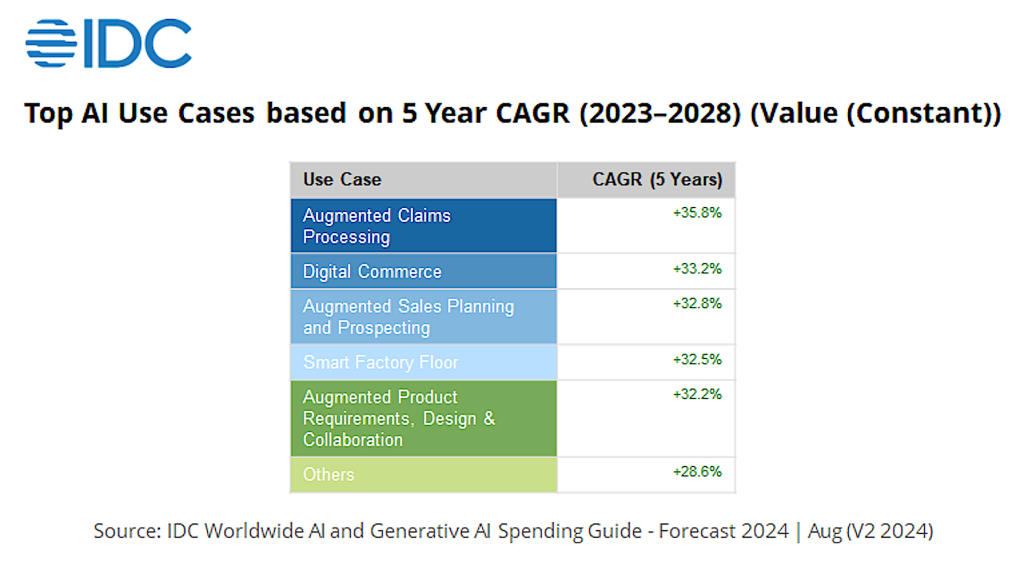
Worldwide spending on artificial intelligence (AI), including AI-enabled applications, infrastructure, and related IT and business services, will more grow by 29% annually at least through 2028 and reach a value of $632 billion, according to a new IDC Worldwide AI and Generative AI Spending Guide.
The financial services industry is expected to spend the most on technology, with banking leading the way; financial services will account for more than 20% of all AI spending, followed by software and information services and retail. Combined, those three industries will account for roughly 45% of all AI spending during the period.
The industries likely to see the fastest AI spending growth are business and personal services (with a 32.8% combined annual growth rate) and transportation and leisure (31.7% CAGR). In addition, 17 of the 27 industries included in the spending guide are forecast to have five-year CAGRs greater than 30%.
The growth in spending is driven mostly by the rapid incorporation of AI, and generative AI (genAI) in particular, into a wide range of products, according to IDC.
“AI-powered transformations have delivered tangible business outcomes and value for organizations worldwide and they are building their AI strategies around employee experience, customer engagement, business process, and industry innovations,” Ritu Jyoti, group vice president of AI and Data Research at IDC, said in a statement.
As AI continues to evolve, Ritu said barriers to “AI adoption at scale will continue to diminish.”
IDC
While genAI has captured the world’s attention over the past 20 months, spending on that technology will account for only one-third that for all other AI applications, such as machine learning, deep learning, and automatic speech recognition and natural language processing, according to IDC.
The rapid growth in genAI investments, however, means it will outpace the overall AI market with a five-year combined annual growth rate of 59.2%, according to IDC.
By 2028, IDC expects spending on genAI tools and platforms to reach $202 billion, representing 32% of overall AI spending.
Even as AI reshapes the hiring and skills landscape, the technology itself will eventually just be embedded in all digital tools, meaning in four years most executives won’t even be using the term “AI.”
“Really, we’re seeing its use mainly in development, software, testing, quality, customer care service as initial use cases. So, it’s slowly getting woven into everyone’s work,” Ken Englund, who leads EY’s Americas Technology Growth sector, said in a recent interview.
IDC also found software will be the largest category of AI technology spending, representing more than half the overall market for most of the four-year forecast.
AI spending in the United States is expected to reach $336 billion in 2028, making it the largest geographic region for AI investment and accounting for more than half of all AI spending through 2028. GenAI spending in the US is forecast to hit $108 billion by 2028.
Western Europe will be the second largest region for AI spending, followed by China and Asia/Pacific (excluding Japan and China), according to IDC.
Two-thirds of all software spending will go to AI-enabled applications and platforms, or software that provides tools and resources for building, training, deploying, and managing AI applications.
The demand for AI platform software is expected to grow 40% a year over the next four years, rising from $27.9 billion in sales last year to $153 billion in 2028, according to an earlier IDC report. That report focused on the rapid pace by which AI platforms, such as Microsoft Azure AI, Amazon AI services, Google Cloud AI, and OpenAI grew last year, and how that growth is projected to maintain a “remarkable momentum,” driven by the increasing adoption of technology across many industries.
A large remainder of AI spending, according to IDC, will be on AI application development and deployment and AI system software (which provides basic foundational layers that enable bare metal infrastructure hardware resources to host higher-level application development and deployment).
Spending on AI hardware, including servers, storage, and Infrastructure as a Service (IaaS), will be the next-largest category of tech spending.
“While industry-specific AI use cases approach 27% of the total spend by the end of the forecast period, the business functions that IDC expects will see accelerated AI investment are customer service, IT operations, and sales.” Karen Massey, research director for IDC’s, Data & Analytics research, said in a statement.
Source:: Computer World
JumpCloud survey highlights the business case for Macs

Enterprises around the world are deploying more Macs than ever before, and IT leaders expect that trend to continue. However, despite the Crowdstrike disaster and sundry well-reported Microsoft security failures since, many IT teams also expect to invest in more Windows deployments, as well.
The latest SME IT Trends report from JumpCloud tells us the average tech stack for small- to mid-size enterprises (SMEs) includes 24% macOS devices (up from 22% in Q1 2024), 18% Linux devices (down from 22%), and 63% Windows devices (up from 60%). The report does not detail the use of iOS devices, but in a multi-device world of distributed endpoints and hybrid working models, iPhones are also seeing increased enterprise deployment.
The business case for macOS
The switch toward Macs in business is real.
Further, in line with a report earlier this year, JumpCloud reported 35% of IT teams anticipate increased Mac deployment in the coming year. And while 47% expect more Windows deployment, 16% expect Windows deployment to decrease in the same time period, compared to 8% who think Mac usage will fall; 25% foresee an increase in Linux use, while 13% predict a decline, the survey said.
Interestingly, in the UK, 25.3% of SMEs are using Macs — even larger than the 22.8% in the US, also according to JumpCloud.
The direction of travel is clear, it’s just taking some time. Why would it not?
The battle of the boardroom
After all, everyone in the C-suite understands that power reflects budget and headcount. And for IT, the more insecure the platform, the more staff and the larger the budget required to manage it.
In a sense, Microsoft is a powerful executive’s best friend — at least in terms of creating that power balance. But it’s questionable whether that happy status will last forever in the wake of the Crowdstrike mess.
The way I see it, the loss of billions of dollars as a consequence of supplier failure means CEOs, CFOs, and others in business have now seen the fiscal consequences of over-reliance on one platform. They’ve also seen previous disasters used as an excuse for increased IT budgets and headcounts. But what results have been delivered? If nothing else, this analysis will increase the number of voices at future board meetings supporting increased Mac adoption.
For the present, however, the JumpCloud report confirms we live in a multi-platform environment. That means companies actively seeking solutions to manage all these platforms as easily as possible.
Platform diversity is the name of the game
“The more our company grows, the more diverse our device mix becomes,” one IT director told JumpCloud. “Some employees only request macOS, some require Windows, and others are die-hard Linux users. It’s only going to grow more complex. The key is finding a solution that can manage them all.” (This, of course, is a reality that the recently-disclosed Jamf deal with Microsoft and Azure reflects — all the vendors in the Apple IT space are now actively seeking such parity.)
Beyond the talk about platforms, the JumpCloud survey confirms other emerging patterns. For example, three-quarters of SMEs rely on managed service providers (MSPs) to help with identity, user, and device management. In today’s business environments, MSPs help handle cloud storage, system security and management, and backups. Disincentives to working with MSPs include cost, and concerns around data security.
Keeping up with HypeAI
As the hype around artificial intelligence (AI) reaches a crescendo, it is also interesting the extent to which business users have become intentional around its deployment. Yes, 90% of organizations plan to implement AI initiatives in the next 24 months, but few intend to do so quickly. Indeed, 61% of IT pros think AI is outpacing their organization’s ability to protect against threats — and 25% of organizations have already experienced AI-generated attacks, the survey claims.
Not only this, but when asked how AI will impact their day-to-day job, 22% characterize the impact of AI as being much lower than they thought it would be. Thirty-four percent say the potential impact is moving slower than they thought it would, while 23% say it’s even faster than they expected. While it’s hard to draw too many conclusions from these data points, they do suggest that the reality behind the hype is beginning to dawn on then tech industry — perhaps the capacity to create fake videos isn’t such a great business to be in?
Everything is change, keep changing
One big takeaway that permeates the entire report is change. We’re using more devices, more platforms, and more services than before. Shadow IT is a growing problem, while the move toward MSPs is intensifying. Business leaders want good systems that help them control increasingly complex stacks, and the old war between incumbent technology and incoming change is being lost, one major Mac deployment at a time.
It’s no surprise. As the shortcomings of some platforms become more visible, expect to see others in the C-suite (CFOs, CEOs, human resources and business continuity experts) stand up against every growing IT budget, citing the security, TCO, and employee preference benefits of making such moves. The old ways are, it seems, rapidly changing; it’s way past time.
Please follow me on LinkedIn, Mastodon, or join me in the AppleHolic’s bar & grill and Apple Discussions groups on MeWe.
Source:: Computer World
A new AI system promises to enhance your tennis swing — and your racket
How to Use Split Screen on a Mac?
How to Hard Reset an HP Laptop?
For August, Patch Tuesday means patch now

Microsoft pushed out 90 updates this week in its August Patch Tuesday release, including fixes for five Windows zero-days (CVE-2024-38178, CVE-2024-38193, CVE-2024-38213, CVE-2024-38106, CVE-2024-38107) and one zero-day affecting Office (CVE-2024-38189).
Unfortunately, this means a “Patch Now” recommendation for both Windows and Microsoft Office this month. Microsoft offered several (pretty useful) mitigations and recommendations to reduce the impact of these security issues; our testing guidance reflects this, with a focus on the networking related features of Windows.
Minor updates for the Microsoft development platforms can be added to your standard patch release schedule, while Microsoft did not release any patches for Microsoft SQL Server or Exchange Server. And Adobe Reader updates are back, though we assume this will be included in your Windows desktop Patch Now release cycle.
The team at Readiness has provided a helpful infographic that outlines the risks associated with each of these updates. (See our running list of recent Patch Tuesday updates here.)
Known issues
Each month, Microsoft publishes a list of known issues affecting the operating system and platforms included in the latest update cycle, including these two reported minor issues:
- After installing the Windows update released on or after July 9, 2024, Windows Servers might (intermittently) affect Remote Desktop Connectivity across an organization. This issue might occur if legacy protocol (Remote Procedure Call over HTTP) is used in Remote Desktop Gateway. Microsoft is working on a resolution.
- There’s an issue where “players” on Arm devices are unable to download and play Roblox via the Microsoft Store on Windows. This might be a good time to “block out” (sorry, not sorry) some time to look at potential compatibility issues on ARM platforms. Don’t forget to try to change your account profile photo — oh, wait!
Major revisions
This Patch Tuesday saw the following major revisions to past Microsoft security and feature updates, including:
- CVE-2024-29187: WiX Burn-based bundles are vulnerable to binary hijack when run as SYSTEM. Microsoft released updates on Tuesday for Microsoft Visual Studio 2017 version 15.9, Microsoft Visual Studio 2019 version 16.11, and Microsoft Visual Studio 2022 to address this GitHub-related issue.
- CVE-2024-35058: BitLocker Security Feature Bypass Vulnerability. Microsoft has added a FAQ to explain that because of firmware incompatibility issues, BitLocker would go into recovery mode on some devices; the fix for CVE-2024-38058 has been disabled with the release of this month’s updates. Customers who want to be protected can apply the mitigations described in KB5025885.
Mitigations and workarounds
Microsoft published the following vulnerability-related mitigations for this month’s release cycle:
- CVE-2024-38199: Windows Line Printer Daemon (LPD) Service Remote Code Execution Vulnerability. Microsoft recommended as part of their mitigation strategy that all corporate users no longer install the LPD utility. Given that this reported vulnerability has been publicly disclosed, the Readiness team highly recommends a scan of your environment to ensure that this service is not running (and preferably not installed).
- CVE-2024-38159 and CVE-2024-38160: Windows Network Virtualization Remote Code Execution Vulnerability. To reduce exposure to this vulnerability, Microsoft recommends that Hyper-V be disabled on the target machine.
- CVE-2024-38140: Windows Reliable Multicast Transport Driver (RMCAST) Remote Code Execution Vulnerability. Microsoft offers solid advice here. This vulnerability is only exploitable if there is a program listening on a Pragmatic General Multicast (PGM) port. If PGM is installed or enabled, but no programs are actively listening, this vulnerability is not exploitable.
Each month, the team at Readiness analyses the latest updates and provides detailed, actionable testing guidance based on a large application portfolio and a detailed analysis of the patches and their potential impact on Windows and app installations. We have grouped the critical updates and required testing efforts into separate product and functional areas, including:
Microsoft Office
Due to the changes to Microsoft Outlook and .NET components, we recommend a full test of sending/receiving mails with HTML content.
Microsoft .NET and developer tools
Microsoft updated both Microsoft .NET (Version 8) and Visual Studio 2022 with the following testing recommendations
- Due to the update to System.Net.Mail.SmtpClient a test of sending mail over TLS with a HTTP body will be required.
Windows
With the release of the Windows updates, Microsoft put a real focus on securing Windows networking features with updates to core system files such as AFD.SYS; these will require the following testing:
- Network packets: try using a web browser to download and upload large files from both internal and external websites. Multicast senders will require validation on packet returns.
- Network sockets: check that bind, connect and listen functions work as expected. Close socket functions will require testing this month, as well.
- Smartcards: full logon/logoff testing will be required.
- Network Bridges: This update will require testing across two or more network adapters. Try creating a bridge using IPv6 packets.
- Bluetooth: Sending files across two Bluetooth adapters will require testing.
- DNS: Recursive DNS queries will require a basic test. Have a look for any SERVFAIL returns or time-outs. We also suggest trying NETSH to configure proxy settings.
- Remote Desktop: Test remote configurations on RRAS platforms while using copy/paste functions over a VPN.
In addition to these networking-focused changes, Microsoft updated core features in the Windows desktop and server platforms, including:
- Windows Error logs: a complete CRUD test (create, read, update and delete) will be required for Windows log files.
- Kerberos: Logon and certificate workflows will require validation.
- Codec and camera updates will require a basic test of camera (both still and video) features.
- Hyper-V: With only minor changes to the Microsoft Hyper-V platform, a basic VM startup and shut-down test is recommended.
Microsoft made a number of significant changes to the Windows file system (NTFS) with changes to both the NtQueryEaFile and NtSetEaFile APIs. Unfortunately, a significant testing cycle is required that should include large file CRUD file tests — and remember to include a query component. The Readiness team suggests that a PowerShell test be included to assist with “pacing” rapid changes to the Windows file system.
Given recent challenges with CrowdStrike and BitLocker, Microsoft published changes that will require testing of the Microsoft BitLocker recovery environment.
Windows lifecycle update (now including enforcements)
This section contains important changes to servicing, significant feature deprecations and security-related enforcements across the Windows desktop and server platforms.
- Enforcements: Now that we are past the July 2024 deadline for the enforcement phase, the Windows certificate “Windows Production PCA 2011” will be automatically revoked.
- Lifecycle: Both Windows 11 Enterprise, Versions 21H2 and 22H2, have an end of servicing date of Oct. 8.
Each month, we break down the update cycle into product families (as defined by Microsoft) with the following basic groupings:
- Browsers (Microsoft IE and Edge).
- Microsoft Windows (both desktop and server).
- Microsoft Office.
- Microsoft Exchange Server.
- Microsoft Development platforms (ASP.NET Core, .NET Core and Chakra Core)
- Adobe (if you get this far).
Browsers
Microsoft released 11 updates to the Edge browser platform. These low-profile changes have been rated as either important or moderate, reflecting their lower security and deployment risks. We recommend following the stable channel release of Microsoft Edge, as there will be mid-cycle releases at the end of this month. Add these browser updates to your standard release schedule.
Windows
Microsoft has released six critical and 60 updates rated as important by Microsoft with five zero-day patches (as already noted, they are: CVE-2024-38178, CVE-2024-38193, CVE-2024-38213, CVE-2024-38106, and CVE-2024-38107.
In addition to these updates, Microsoft released patches that affect the following Windows feature groups:
- Windows DNS, broadband, routing, translation and multicast networking features.
- Kernel mode and system drivers.
- Line printer services (daemon).
- Windows OLE.
- Windows Kerberos.
Given the larger (and somewhat concerning) number of exploited and publicly disclosed vulnerabilities this month, we again recommend a “Patch Now” schedule for this update.
Microsoft Office
Microsoft returns to form with one critical rated update to Copilot (CVE-2024-38206) and nine other updates to the Microsoft Office suite, all rated important. Unfortunately, one of the vulnerabilities (CVE-2024-38189) that affects the entire Office platform has been reported as exploited. Add Microsoft Office to the Patch Now release schedule.
Microsoft SQL (nee Exchange) Server
Good news: no updates or patches for either SQL Server or Exchange Server.
Microsoft development platforms
Microsoft released four low-profile updates to the Microsoft .NET and Visual Studio 2022 platforms. We do not expect serious testing requirements for these lesser reported vulnerabilities. Add these updates to your standard developer release schedule.
Adobe Reader (and other third-party updates)
Adobe Reader is back in the game with an important update, APSB24-57, which has addressed 12 memory and “use after free” (my favorite) security vulnerabilities; it can be added to your Windows update cycle.
Source:: Computer World
Kim Dotcom: 5 outrageous moments from the internet’s anti-hero
$45B valuation — Revolut becomes Europe’s most precious private tech firm
How To Cancel iCloud Storage Plan?
MIT delivers database containing 700+ risks associated with AI

A group of Massachusetts Institute of Technology (MIT) researchers have opted to not just discuss all of the ways artificial intelligence (AI) can go wrong, but to create what they described in an abstract released Wednesday as “a living database” of 777 risks extracted from 43 taxonomies.
According to an article in MIT Technology Review outlining the initiative, “adopting AI can be fraught with danger. Systems could be biased or parrot falsehoods, or even become addictive. And that’s before you consider the possibility AI could be used to create new biological or chemical weapons, or even one day somehow spin out of control. To manage these potential risks, we first need to know what they are.”
Source:: Computer World
For IT, Jamf’s Microsoft Azure partnership means a lot

Jamf has removed yet another brick in the wall put up by Windows-centric IT staffers to fend off acceptance Macs in the enterprise, revealing a new partnership with Microsoft that simplifies management of both Windows and Apple devices using Microsoft Azure.
The arrangement means Jamf device management solutions will be hosted on Microsoft Azure and made available for purchase on the Azure Marketplace.
The Apple device management company has also joined the Microsoft ISV Partner Program and reached a five-year agreement to expand its existing collaboration with new and innovative Microsoft Cloud and AI-powered solutions.
Apple is in the enterprise tent
This builds on work both companies have been doing since at least 2017, as they responded to the realization that most enterprises now recognize the value of Apple products within their ecosystems.
This trend kick-started when the iPhone entered the workplace as an employee-owned device and grew to include employee-choice schemes across multiple platforms.
Of course, those in IT with vested (and sometimes expensively qualified) interest in Microsoft’s hegemony continue to sit on their thrones before a restless ocean to deny the changing tides — and those are the ones most likely to benefit from the new partnership between Jamf and MIcrosoft.
That’s because the move to make Jamf Pro available via Azure (cloud and marketplace) means those accustomed to using Azure to help manage and secure Windows devices can now use Jamf to manage and secure Apple devices from within the same familiar, unified environment.
More than Windows
This goes beyond just the PC. Many companies rely on Microsoft’s back-end technologies and services, so the move to bring Jamf into Azure will make life a little easier there too.
To an extent, this reflects what current Jamf CEO, John Strosahl told me last year: “Many companies still use Windows applications and services, and we do support some of those activities on network security and the like — things that are further from the device. But the closer you get to the device, the more we believe that Apple is the future.”
With Azure, it will be much easier to integrate iPhones, iPads, and Macs in complex IT workflows built on Microsoft’s enterprise cloud platform.
The direction of travel has been clear for a while, particularly as Jamf integrates with Microsoft Intune and Entra ID. In truth, Jamf and Microsoft have created a string of landmark partnerships in recent years, including integrations across Sentinel, Defender, and Copilot for Security. Jamf joined the Microsoft Intelligent Security Association (MISA) in 2023.
The Apple enterprise
The news should also help Windows-based tech support take better control over the security of those Apple devices that are already deployed across their networks.
With as many as 75% of enterprise employees ready to choose a Mac if given a choice, IT really should take security seriously. Earlier this year, Jamf reported that 40% of mobile users and 39% of organizations are running a device with known vulnerabilities. Apple itself has also warned that the number of data breaches has at least tripled since 2013. (Though it is fair to say that Apple is not the platform most impacted, which is a story that speaks many volumes on its own account.) Timely updates on every platform should be in your supplier SLAs.
“It’s time for organizations to get their modern device estates in order by embracing industry best practices and building a defense-in-depth strategy for the hybrid workforce,” Michael Covington, vice president of portfolio strategy at Jamf, said earlier this year.
Soon, with Jamf and Azure, it will become a little easier to do just that. The multi-platform future of enterprise technology continues to emerge, and Apple will play a big part.
Please follow me on Mastodon, or join me in the AppleHolic’s bar & grill and Apple Discussions groups on MeWe.
Source:: Computer World
British police to test drone flights beyond the line of sight
How to Download A YouTube Video to A flash Drive for Offline Viewing
Mozart and the digital twin for music


