


Realme GT 6T Review: The Jack of All Trades

Microsoft’s Team Copilot aims to help manage meetings, group chats

So far, Microsoft’s 365 Copilot has mainly been positioned as a personal assistant for individual workers, helping them draft emails or recap meetings they might have missed. With the upcoming launch of Team Copilot, Microsoft wants to make its generative AI (genAI) assistant accessible in group settings, helping enable video meetings and coordinating team projects.
“Microsoft Team Copilot makes a great deal of sense as the next step in equipping the workforce with AI-based tools,” said J.P. Gownder, a vice president and principal analyst at Forrester Research. “We know that productivity isn’t confined to individual work, so having Copilot for 365 help with group-oriented tasks will only improve overall productivity.”
Microsoft highlighted three key use cases for the Team Copilot.
First, the bot can be added to a Teams video call as a “meeting facilitator,” Jared Spataro, Microsoft’s corporate vice president for AI at work, said in a blog post. Here, it can take notes that can be viewed and edited by all meeting participants, as well as create follow-up tasks that all can see; track time for each agenda item; and assist in-person or hybrid meetings when integrated with Teams Rooms.
Second, colleagues can interact with the Team Copilot in group text chats within Teams. Here the Copilot can summarize lengthy conversations to surface the most important information to all participants, as well as answer questions from the group.
Meeting summarization and note-taking have emerged as popular uses for AI assistants, said Gownder, “so making that a group-oriented assistant that helps everyone attending the meeting also makes sense. I think this is a great product evolution.”
Finally, the Team Copilot can be used to help manage projects, creating tasks and goals within Microsoft’s Planner app that it can then assign to individual workers. It can also complete tasks itself — such as drafting a blog post — and notify team members when additional input is needed.
While Gownder sees potential for the Team Copilot to improve productivity, he noted that some of Microsoft’s messaging around the product is sloppy.
“It says that Team Copilot will engage in ‘meeting facilitation,’ which isn’t what it’s doing,” he said. “Meeting facilitation means acting as the leader of a meeting, ensuring inclusivity, keeping people on-subject and on-time. It’s a particular skill. Team Copilot doesn’t do this; it creates agendas, tracks time, takes notes, summaries key takeaways, and shares files.”
Group moderation is another term that’s wide of the mark, he said. “Moderation sounds like what happens on Reddit — keeping people in line and censoring inappropriate comments. That’s again not what Copilot does; it’s acting more as a business insights assistant for group interactions and meetings,” said Gownder.
All in all, the strategy and the product direction for Team Copilot “make a lot of sense,” he said, assuming they work as described; Copilot for Microsoft 365 remains a work in progress, said Gownder, with genAIunpredictable at times.
The Team Copilot will be available in preview later this year for Microsoft 365 customers with a Copilot subscription.
Source:: Computer World
Windows Recall lets you rewind actions on a PC
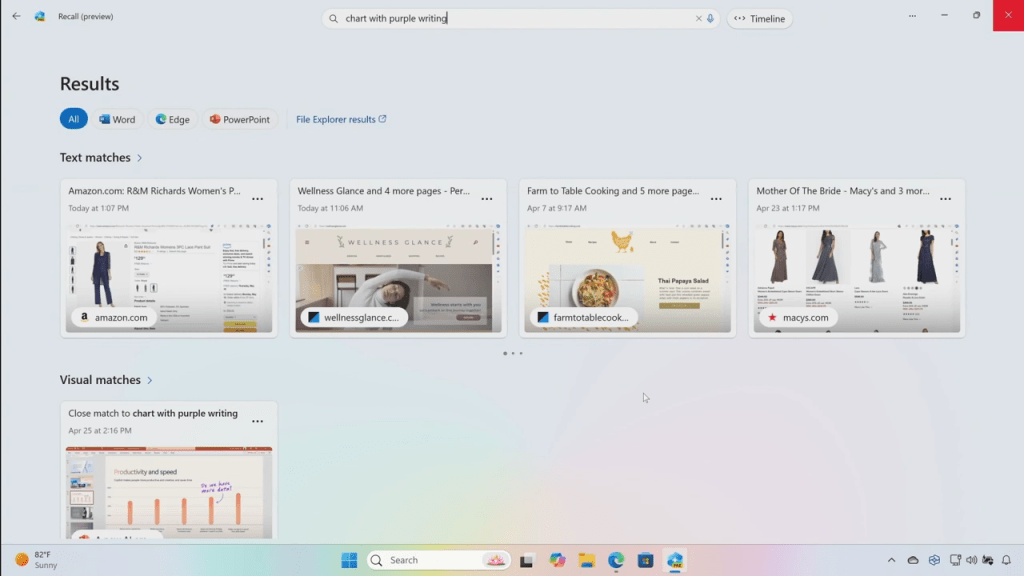
Microsoft is bringing a new AI-powered search function to Windows 11 that lets users find and retrieve information across any app they’ve accessed.
The new feature, Windows Recall, essentially records all user actions on a PC, taking snapshots of the screen at 5 second intervals. This allows Recall to generate a searchable timeline of everything they’ve interacted with, whether that’s an application, website, document, image, or anything else. It could mean searching for anything from references to a work-related topic across different documents, or a conversation with a friend on a chat app, whether on a desktop app or via a web browser.
“We set out to solve one of the most frustrating problems we encounter daily — finding something we know we have seen before on our PC,” Yusuf Mehdi, Microsoft’s executive vice president and consumer chief marketing officer, said Monday in a blog post. “Today, we must remember what file folder it was stored in, what website it was on, or scroll through hundreds of emails trying to find it.
“Now with Recall, you can access virtually what you have seen or done on your PC in a way that feels like having photographic memory.”
“If Recall works as well as planned, it will be a major productivity booster and probably one of the most useful productivity tools we’ve seen in years,” said Jack Gold, principal analyst with business consultancy J. Gold Associates.
“Being able to instantly find data you know you have ,but have no idea where you put it, or instantly recall that website that was so useful — but you can’t remember what it was — will be a game changer.”
Microsoft
The Recall feature will have uses in the workplace, too, he said.
“Business users are inundated with data these days,” he said. “Having an assistant monitor you in the background and being able to recall what you did/where you put it will be huge.”
That said, the feature needs to function as planned: if it’s buggy or doesn’t live up to Microsoft’s promises, business users might be put off relying on Microsoft’s AI for productivity tasks.
Snapshot data recorded by the Recall feature is stored and processed on a user’s device, said Microsoft. Users have control over what’s recorded and stored. It’s possible, for example, to delete individual snapshots, adjust and delete ranges of time, or pause the recording entirely. Users can also choose to filter certain apps and websites that they don’t want recorded, Microsoft said.
Gold doesn’t see privacy and security concerns being a hindrance to adoption. “As long as it all stays on my device and Recall isn’t sending anything to Microsoft, I and most users would be fine with that,” he said.
“Microsoft needs to insure that the Recall data stored locally is safe and not ‘hackable,’ which is a tall ask,but absolutely critical if it’s to be trusted,” said Gold. “Imagine a hacker being able to access Recall data and knowing everything you’ve done or been to forever! How Microsoft assures of this data safety is important to whether its acceptable for our use.”
Recall is one of several AI features for Windows 11 announced Monday, including Live Captions and a Cocreator image generation tool. All the features will be available on the new range of Copilot+ PCs unveiled by Microsoft and other vendors, including Acer, Asus, Dell, Lenovo, and Samsung.
Source:: Computer World
As UK launches semiconductor institute, EU chips get €2.5B boost
EU’s AI Act set to enter force next month
What Are Copilot Plus PCs? Should You Upgrade Now?
Slack updates AI ‘privacy principles’ after user backlash

Slack has updated its “privacy principles” in response to concerns about the use of customer data to train its generative AI (genAI) models.
The company said in a blog post Friday that it does not rely on user data — such as Slack messages and files — to develop the large language models (LLMs) powering the genAI features in its collaboration app. But customers still need to opt out of the default use of their data for its machine learning-based recommendations.
Criticism of Slack’s privacy stance apparently started last week, when a Slack user posted on X about the company’s privacy principles, highlighting the use of customer data in its AI models and requirement to opt out. Others expressed outrage on a HacknerNews thread.
On Friday, Slack responded to the frustrations with an update to some of the language of its privacy principles, attempting to differentiate between its machine learning and LLMs.
Slack uses machine learning techniques for certain features such as emoji and channel recommendations, as well as in search results. While these ML algorithms are indeed trained on user data, they are not built to “learn, memorize, or be able to reproduce any customer data of any kind,” Slack said. These ML models use “de-identified, aggregate data and do not access message content in DMs, private channels, or public channels.”
No customer data is used to train the third-party LLMs used in its Slack AI tools, the company said.
Slack noted the user concerns and acknowledged that the previous wording of its privacy principles contributed to the situation. “We value the feedback, and as we looked at the language on our website, we realized that they were right,” Slack said in a blog post Friday. “We could have done a better job of explaining our approach, especially regarding the differences in how data is used for traditional machine-learning (ML) models and in generative AI.”
“Slack’s privacy principles should help it address concerns that could potentially stall adoption of genAI initiatives,” said Raúl Castañón, senior research analyst at 451 Research, part of S&P Global Market Intelligence.
However, Slack continues to opt customers in by default when it comes to sharing user data with the AI/ML algorithms. To opt out, the Slack admin at a customer organization must email the company to request their data is no longer accessed.
Castañón said Slack’s stance is unlikely to allay concerns around data privacy as businesses begin to deploy genAI tools. “In a similar way as with consumer privacy issues, while an opt-in approach is considerably less likely to get a response, it typically conveys more trustworthiness,” he said.
A recent survey by analyst firm Metrigy showed that the use of customer data to train AI models is the norm: 73% of organizations polled are training or plan to train AI models on customer data.
“Ideally, training would be opt-in, not opt-out, and companies like Slack/Salesforce would proactively inform customers of the specifics of what data is being used and how it is being used,” said Irwin Lazar, president and principal analyst at Metrigy. “I think that privacy concerns related to AI training are only going to grow and companies are increasingly going to face backlash if they don’t clearly communicate data use and training methods.”
Collaboration Software, Data Privacy, Generative AI, Productivity Software, Slack
Source:: Computer World
Does Apple want to lower genAI expectations for WWDC?

There’s been a change in tone concerning what to expect from Apple’s forthcoming AI announcements at WWDC, so perhaps it’s time to moderate the hype.
What we’ve been hoping for is an impressive counterattack from the company, one designed to shrug off speculation the company is falling behind on AI. With thousands of engineers and billions of dollars focused on AI research and development, there’s been building expectations of something impressive from the company. However, if Apple industry bellwether Mark Gurman has it right, Apple’s planned announcements, while good, might not quite reach the pinnacle of great.
Is better enough?
That doesn’t mean what’s coming won’t be interesting or noteworthy. Gurman seems to expect some impressive highlights, including tools such as voice memo transcription, summaries of notifications and web pages, and generative AI-powered editing tools.
The latter will apparently work in a similar way to how genAI works in Adobe’s creative apps, which presumably means you’ll be able to generate machine-created images and apply edits using voice/text prompts on your devices. Gurman doesn’t seem to think these will impress regular Adobe users, but given that most of the world’s population don’t use Adobe, it’s reasonable to suppose that for many millions of people, Apple’s tools will be their first exposure to the potential of such technologies.
The gap remains
All the same, despite Apple’s advantages in market reach and platform size, Gurman claims Apple executives still think there is a gap between the current pace of Apple’s genAI development and that of its competitors. He even says this gap is unlikely to close soon, which is perhaps why Apple has been speaking to competitors such as OpenAI, Google, and Baidu.
It’s possible we’ll learn of a deal between OpenAI and Apple at or around WWDC 2024, potentially including integration of ChatGPT natively on the iPhone. We might also see interesting new features built on the company’s recently introduced tools for accessibility.
If Apple’s truly not quite there yet, it will not want to disappoint with weak-tea WWDC news — and that makes this a good time to constrain the optimism. This part of the match isn’t over; Apple and AI is a work in progress; and the company’s R&D teams continue to churn out powerful-seeming foundational technologies, including its very own multimodal LLM mode, called Ferret.
The privacy thing
One area of speculation I don’t think Apple hopes to quash revolves around privacy and edge AI. It seems probable that edge intelligence will guide some features, implying that when you do use genAI on your iPhone, the process/data will be kept confidential.
That is essential if Apple wants to make using these tools a customary part of daily life, particularly in the enterprise space. With that in mind, it is curious that the tone of Gurman’s comments suggest Apple’s focus on privacy and security is limiting what it can achieve with AI — but does at least value the information. Apple is planning its own cloud-based genAI services that should deliver functionality and security, and is investing in highly secure data center processors.
There is a one more card in play that could work in Apple’s favor in the long game: ChatGPT and Google Gemini are server-based solutions, but their future evolution will be constrained by AI regulation and the need to maintain data sovereignty.
These forces will become a barrier to growth, and it remains possible that by focusing on data privacy today, Apple could hold a winning hand by the end of the game. So, while company insiders may be attempting to guide expectation a little lower as we travel toward the new AI iPhone in fall, the game at this table isn’t over yet. Partnership, or even acquisition, could be the next set of cards in Apple’s deck.
Please follow me on Mastodon, or join me in the AppleHolic’s bar & grill and Apple Discussions groups on MeWe.
Apple, Generative AI, iOS, Mobile
Source:: Computer World
Apple Memorial Day sales: Save on Apple Watch, iPad, MacBook, and more
By Aaron Mamiit
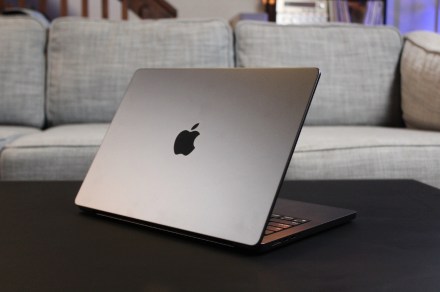
Apple Memorial Day sales are now live ahead of the holiday. Don’t miss this chance to buy an iPad, iPhone, AirPods, MacBook, or Apple Watch with a discount.
Source:: Digital Trends
Best Buy Memorial Day sale: early TV, laptop, and appliance deals

If you’re looking for some of the best deals around, then these early Best Buy deals for Memorial Day should be right up your alley.
Source:: Digital Trends
iPhone 16 Rumors: What To Expect In 2024?
MX-23.3 ‘Libretto’ Released: Setting New Linux Distro Standards
Ebikes are more popular than ever, but we’re nowhere near a car-less world
Latest Manjaro Linux 24.0 “Wynsdey” Available For Download
With three zero-days, it’s a patch-now Patch Tuesday for May

Microsoft released 62 updates on Patch Tuesday this week, with three zero-days (CVE-2024-30051, CVE-2024-30046, and CVE-2024-30040) forcing a “patch now” deployment guidance for Windows desktops. Adobe is back with a “Patch Now” update, while Microsoft Office, Edge browsers and Microsoft’s development platform (Visual Studio and .NET) can be dealt with using standard release schedules.
Unusually for Azure updates, the Readiness team recommends particular attention be paid to an Azure Agent update (CVE-2024-30060), as it can affect corporate VM’s (associated with testing or development platforms). The team has provided an infographic outlining the risks associated with each of the updates for this month’s cycle.
Known issues
Each month, Microsoft publishes a list of known issues related to the operating system and platforms included in each cycle; the following two reported minor issues:
- Windows devices using more than one monitor might experience issues with desktop icons moving unexpectedly between monitors or other icon alignment issues when attempting to use Copilot in Windows (in preview). Yes, Microsoft is still working on this one.
- There appears to be an issue with how Windows clients receive their updates after installing KB5034203. Instead of downloading from their peers or designated enterprise update endpoints, clients that use DHCP option 235 will download from the internet instead. Aside from the (serious) security concerns in getting your updates from outside your organization, some clients will see a significant increase in their internet traffic.
And for all you Windows 11 users, Microsoft has reported that after installing this update you might not be able to change your profile photo from the default. (For many, this is a good thing.)
Major revisions
This month, Microsoft published the following major revisions to past security and feature updates:
- CVE-2024-30009: Windows Routing and Remote Access Service (RRAS) Remote Code Execution. The FAQs were updated for this Microsoft patch. This is an information change only.
- CVE-2024-30044: Microsoft SharePoint Server Remote Code Execution Vulnerability. Microsoft updated the documentation, added a FAQ, and updated the CVSS score for this critical update.
- CVE-2024-30046: Visual Studio Denial of Service Vulnerability. Microsoft has revised the Security Updates table to include .NET 7.0 and .NET 8.0 as these versions of .NET are now affected by this vulnerability.
I’m not sure where to place this latest (and late) addition to the May patches. Microsoft released a major update (CVE-2024-30060) to the Azure agent (we use this Microsoft tool for our Azure-based application packaging, conversion and testing Virtual Machines). If you are using Azure-based VMs, this update will be important for all your builds. Unfortunately, this vulnerability has been publicly disclosed and adds to our tally of May Patch Tuesday zero days.
Mitigations and workarounds
As of May 17, Microsoft has not published any mitigations or workarounds for this month’s patch cycle.
Testing guidance
Each month, the team at Readiness analyzes the latest updates and provides detailed, actionable testing guidance. This guidance is based on assessing a large application portfolio and a detailed analysis of the patches and their potential impact on the Windows platforms and application installations.
We have grouped the critical updates and required testing efforts into functional area including:
Microsoft Office
- A change to how OLE handles web content will require a test scenario for embedding and loading external web content (text, images and video).
Microsoft .NET and developer tools
- Microsoft SQL server updates will require a test of new connections with different versions of SQL Server. Line-of-business (LOB) applications that rely on SQL server connections will require a full UAT before releasing this month’s developer update.
Windows
The following core Microsoft features have been updated and might require attention:
- The updates to the Windows Common Error log feature (CLDFLT.SYS) will require testing of creating, reading, updating and deleting (CRUD) log files.
- DNS updates will require testing for non-existing domains registered in each managed zone.
- This month’s update to the Microsoft Crypto library will require tests of new creation and deletion.
- Microsoft’s Routing and Remote Access Servers (RRAS) servers will require light testing for valid connections.
- Smartcard access to Microsoft Windows desktops will require basic access testing.
Aside from updating several key features on the Windows desktop platform, Microsoft also updated the way the following APIs are handled:
- SetFileBandwidthReservation and GetFileBandwidthReservation;
- The MMC and Windows Shell (MPRAPI.DLL);
- Microsoft’s CNG crypto implementation (NCRYPT.DLL).
These are tough updates to test properly, as you need a detailed list of what applications depend upon (and actually use) these APIs.
Automated testing will help (especially a testing platform that offers a “delta” or comparison between builds). However, for LOB apps, getting the application owner (doing UAT) to test and approve the results is absolutely essential.
This month, Microsoft made a major (general) update to the Win32 and GDI subsystems with a recommendation to test out a significant portion of your application portfolio.
Windows lifecycle update
This section will contain important changes to servicing (and most security updates) to Windows desktop and server platforms.
- Support for Windows 10 (21H2) ends this month. In fact, support ends before the next Patch Tuesday. This is serious now, people.
- Microsoft SQL Server (2014 SP3 CU4): the final stage of support (aka Security Support) ends in five weeks.
- Microsoft Visual Studio 2022 loses full support in less than two months.
Each month, we break down the update cycle into product families with the following basic groupings:
- Browsers (Microsoft IE and Edge)
- Microsoft Windows (both desktop and server)
- Microsoft Office
- Microsoft SQL Server (not Exchange Server)
- Microsoft Development platforms (ASP.NET Core, .NET Core and Chakra Core)
- Adobe (if you get this far)
Browsers
Microsoft and the Chromium project have been releasing patches to both Chrome and Edge every three or four days since the latest major update in April. So far, there are now seven updates to Chrome (with the recent addition of CVE-2024-30056), all of which are rated important. These security vulnerabilities relate to memory handling and “use after free” issues but have not been reported as exploited or publicly disclosed. Add these updates to your standard release schedule.
Windows
Microsoft published 46 updates for the Windows desktop and server updates. For this (much smaller) release to the Windows desktop platform, the following functional areas have been updated:
- Windows Common Log File System Driver Windows Hyper-V;
- Windows Cryptographic Services;
- Windows DHCP Server;
- Windows NTFS;
- Windows Win32K – ICOMP;
- Windows RRAS and Remote Access Connection Manager.
Unfortunately, we have three zero-days (CVE-2024-30051, CVE-2024-30046, and CVE-2024-30040) that affect the Windows platform. The team at Readiness has already discovered several applications that are particularly vulnerable to the DWM vulnerability (CVE-2024-30051) which could lead to full SYSTEM (caps added by Microsoft) privileges on the compromised system. Add this update to your “Patch Now” schedule.
Microsoft Office
Microsoft released just three updates for the Office platform. CVE-2024-30042 addresses a remote code execution vulnerability in Excel that is both challenging to exploit and non-wormable. The other updates relate to Microsoft SharePoint. All are rated important and should be added to your standard desktop release schedule.
Microsoft SQL Server (not Exchange Server)
Microsoft has not released any patches for Exchange Server but did push out a single update (CVE-2024-30054) rated important for SQL Server. This update to SQL Server Power BI feature really belongs in the developer release cycle, as it updates Software Development Kit (SDK). Add this to your standard developer release schedule.
Microsoft development platforms
Microsoft released four updates to the development platform, affecting Visual Studio and .NET for those deploying and managing desktop patches. Add these to your standard developer release schedule.
Adobe Reader (if you get this far)
We are back! Adobe released an update to Adobe Reader (APSB24-29) covering 12 memory related and “use after free ” security vulnerabilities that have a serious rating of 8.8. This attracts a “Patch Now” rating from the Readiness team due to Adobe Reader’s tight integration with the Windows desktop ecosystem.
Microsoft, Security, Windows, Windows 10, Windows 11, Windows Security
Source:: Computer World
Review: The M4 iPad Pro — an amazing AI PC
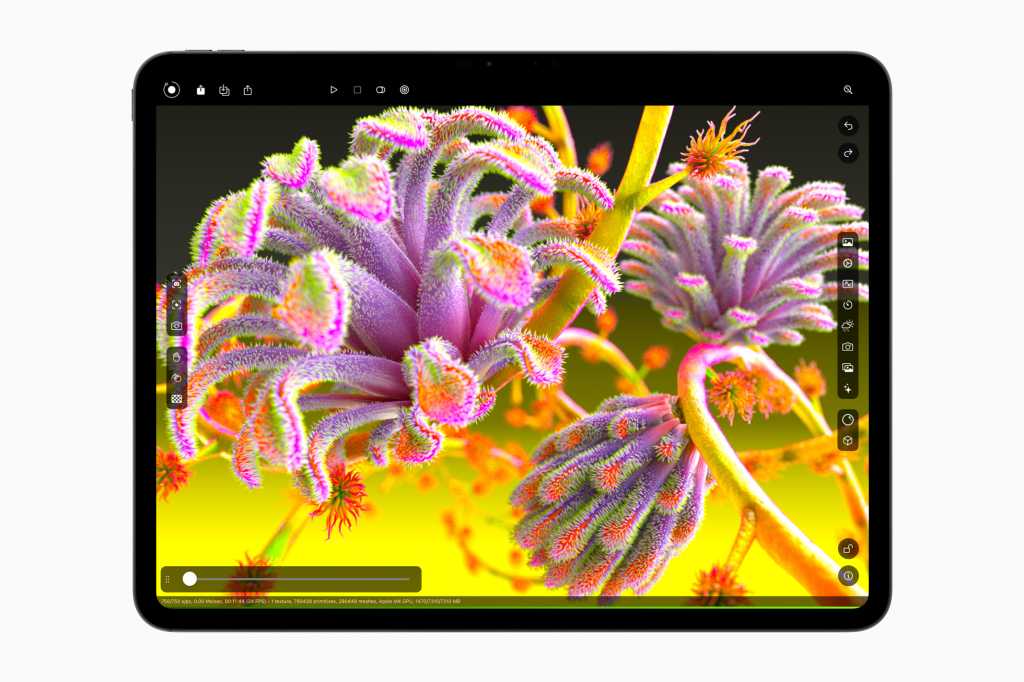
Out of the box, my first reaction when taking hold of Apple’s all-new 11-in. M4-powered iPad Pro was how light it was, closely followed by some sense of wonder at how thin it has become.
The model I’ve been using weighs just 0.98-pounds. (This is the version with both Wi-Fi and cellular capabilities; the equivalent 13-in. model weights 1.28 pounds.)
You got to carry that weight…
To put this into perspective, the previous generation 11-in. model weighed just a little more, 1.04-pounds — but that small, roughly 5% weight reduction is still quite tangible.
I think it’s worth noting that Apple’s first ever cellular-equipped iPad weighed 1.6-pounds when introduced in 2010, meaning this iPad Pro is only 61% as heavy as that first-gen product, the one thousands of C-suite executives acquired.
At 5.3mm, it’s super-thin, too. (The 13-inch model is even thinner). Apple claims it is the thinnest product it has ever made; it’s even thinner than the iPod Nano I sentimentally keep on my desk.
You’d think that thinness would make it easy to bend the product. I’m not about to try that, but I have found the iPad is reinforced with an additional spine to make it more resilient. My take is that you’ll have to try pretty hard to bend this thing, or you could try sitting on it by mistake when taking a flight, as I recently did with another model. It’s probably best to be careful.
Got to get yourself connected
The second set of reactions kicked in once I turned on the device. I’m always impressed at how Apple continues to improve the on-boarding process for its products. To get this machine working, I just had to bring my iPhone across, go through a very simple set up process, create a PIN code and wait for my apps and data to shift over from iCloud. That process takes longer the more data you need to transfer, but it’s painless.
If you’re setting up a managed device, it will be quite similar, though you’ll probably need to enter your Managed Apple ID before the iPad Pro is provisioned for you and your company. Apple’s on-boarding process is excellently executed.
Looks are sometimes everything
Once the iPad had stuffed itself with my data, I picked it up and began to use it. That’s when my fourth big reaction kicked in: the image quality on the tandem OLED display is stupendous.
I mentioned that ill-fated iPad-wrecking flight I took. While I was away, I took holiday photos, including a selection of beautiful, luscious, green landscapes. I like these images, but I have been truly impressed by the true-to-life detail and excellence in color rendering on this particular machine. The multitude of different greens you see in a forest really snap out at you, like being there.
There’s a reason for this, of course. Both iPad Pro models feature what Apple calls an Ultra Retina XDR display and modestly describes as “the world’s most advanced display.” Those greens, deep true blacks, and all the other visual details are there because these displays use technology similar to what’s used in Apple’s XDR display for Macs.
And those Mac displays deliver images just as good as the hugely expensive “reference displays” you find in movie studios. That’s great for iPhoto collections, of course, but also means that when you’re working on video footage or photos in the field, you get state-of-the-art color accuracy on a display that’s bright and beautiful. And packed inside a mobile device with a 10-hour battery life weighing less than a pound. That’s great for creatives.
A mobile creative powerhouse
In case you want the technical details, the display can reach a peak 1,600 nits brightness and a stable 1,000 nits most of the time. It also has a 2,000,000-to-1 contrast ratio, which is another reason colors really pop. And yes, if you need professional color, the device can display reference color for all the popular color standards. This display is a professional workhorse.
But iPad Pro isn’t only for creatives. And while Apple does tend to focus on the creative markets in its marketing materials, this system has something to offer any professional who needs a high-performance and highly portable system for any reason.
It might be over-specced for some enterprise uses of tablets (for which the iPad Air remains a more logical choice). But for use in some sectors (medical, education, and architecture, for example) the iPad Pro’s excellent display is most certainly part of the attraction.
Of course, some of the most challenging users really need to get the best possible performance, and you get that here thanks to the M4 chip inside.
Possibly, the world’s best AI PC…
Apple suggests it needed to use this processor because it wanted to make the iPad Pro thin and to drive the amazing display. The move to M4 also means you get a huge leap in processor performance (1.5x faster than the last model) and graphics (rendering is four times faster).
But what may become more important is that the deployment of this chip means the iPad Pro with M4 will perhaps soon become the world’s ultimate AI-driven tablet, about which we’ll learn much more at WWDC.
I’m willing to speculate that once Apple introduces generative AI in iPadOS, the iPad Pro will be seen as even more than a tablet; you’ll even be able to control it with voice and glance. Think about that and recognize that this means it will also become the ultimate mobile computing (with AI) experience. If Apple gets it right.
If your computer interactions are no longer reliant on keyboard and mice, and your device can deliver the computational power (thanks to the M4 chip) you require, at what point does the PC become history? I think these iPads are part of that story.
But let’s not focus too much on what isn’t here yet, because what we actually have is quite something already. The iPad Pro can easily handle powerful apps such as Procreate, or large spreadsheets, or video apps, or whatever you need to run; all will run faster, perform better, and complete their tasks more swiftly than before.
(It also gives developers of mobile apps an on-ramp for the addition of powerful new features in the future, and a glimpse at M4 Macs.)
What about the Magic Keyboard?
I’m using the iPad Pro with Apple’s new Magic Keyboard. I love it.
Not only does it provide a 14-key function row, but it has been designed to include a comfortable aluminum palm rest and a much bigger, haptic trackpad. It makes working with iPad Pro much more Mac-like, especially as the keypad is backlit for use in darker places. The keyboard is comfortable to use and responsive — so much so, that I’m writing this review with it.
The keyboard is a little heavy. At 1.27 pounds (according to my scales), the Magic Keyboard is actually heavier than the iPad Pro it holds, though the keyboard is a little lighter than the last version. Together, that’s a combined weight of 2.3 pounds — considerably lighter than a 3.4-pound 13-in. MacBook Pro .
Of course, these do different things, and your iPad Pro can deliver all its functionality in a lighter case, along with that precious, Made For AI M4 chip.
Weight aside, if you intend on using your iPad Pro as a highly mobile productive device, the Magic Keyboard is a must.
Write me kindly, sir
Digital creatives have another must-have accessory, the Apple Pencil Pro. Actually, a tiny computer in a pencil, the real achievement here is that Apple has managed to cram so much into something that feels just like the original Apple Pencil.
This iteration lets you squeeze the side to bring up a tool palette; you get unlimited undo; double tap; and a new barrel roll capability which changes the orientation of shaped pen and brush tools. You also get haptic feedback, so when you do something, you’ll feel something, and support for existing pencil features like low latency and “hover.” (Hover lets you precisely place where you want to be, with on-screen objects jumping at you.)
It’s the squeeze function I find most useful; it makes the pencil so much more intuitive to use, as I’ve always kind of struggled moving between modes. Now, it seems much more natural. There are six sets of commands you can set Squeeze to handle, but only one can be in use at any point. The only limitation at present is that apps must be updated to gain all these tools.
More to think about
There are lots of elements I’ve not touched on. One of these is the iPad Pro probably won’t get too hot, as thermal performance has been improved by almost 20%. Another is the four speakers and four microphones inside the system, which support the new landscape front camera to make the device a great tool for video conferencing on Zoom, FaceTime, WebEx, even Teams (if you must).
The primary camera has also been improved for better performance in low light, augmented by AI to secure better images. There’s a built-in document scanner function and a LiDAR camera.
Who pays the iMan?
What may be the world’s most advanced mobile device comes at a price. The model I tested has the nano-texture glass (what’s this?) and 1TB storage. It costs $1,899.
Add the Apple Pencil Pro at a surprisingly low $129 and Magic Keyboard at $299 and the combined system I’ve been testing costs $2,327 — just $71 less than the top-of-the-range 14-in. MacBook Pro with an M3 Pro chip.
Price isn’t the only consideration, of course. You don’t necessarily have to get nanotexture, unless robust color accuracy is something you need. You might not want 1TB of storage. You might not even need cellular, the pencil, or the Magic Keyboard. The entry-level configuration will set you back $999, and frankly from what I’ve seen, you’re still getting a lot at that price. (If you are price conscious, the also-new iPad Air might be precisely what you need. I can’t say, as I’ve not yet looked at that model since I broke my own iPad on that flight.)
Who is this for?
Apple’s varied range of iPads now has something for every price point. The iPad Pro is for aspirational Apple fans, high-end mobile creatives, critical workers in some industries, designers, movie makers, quite possibly data analysts, IT admins and (as ever) the C-suite executives who get everything.
It’s also an amazing, high-class product that I think checks the boxes for almost every task we once relied on computers to achieve. I can’t wait to see how Apple plans to exploit the computational capabilities of the device in the days ahead.
On its own account, the iPad Pro with M4 is a very desirable machine, and while most of us might choose an M2-based iPad Air, those who don’t can look forward to a great experience. And the rest of us can look forward to at least some of these improvements extending across Apple’s other tablets over time.
Please follow me on Mastodon, or join me in the AppleHolic’s bar & grill and Apple Discussions groups on MeWe.
Apple, iOS, iPad, Mobile
Source:: Computer World
Ebike-sharing app Forest rides ad revenue to become ‘cheapest’ in London
This week in Dutch tech
How to Use RetroArch Emulator & Install Game ROMs on iPhones?
Best Buy deals: Save on laptops, TVs, appliances, and more

We’ve collected some of the best Best Buy deals happening today, whether it’s computers or appliances, to help save you a bit of extra money.
Source:: Digital Trends


