Neobank Monzo unveils new anti-fraud features in case of phone theft

Home » Archive by Category "Technology" (Page 218)

By Ioanna Lykiardopoulou

UK-based neobank Monzo has unveiled three app-based security features, aiming to safeguard user accounts from criminals even in the case of phone theft. The new security tools are designed to prevent criminals from transferring or withdrawing amounts from Monzo accounts by offering an additional layer of protection. The digital bank plans to officially roll them out over the coming weeks. To begin with, customers will be able to use the new “known locations” feature to indicate a specific, safe location (like their home or their workplace) where they need to be when moving amounts of money over a certain limit.…

This story continues at The Next Web

Source:: The Next Web

What is an iron flow battery and why is Schiphol Airport testing one?

Home » Archive by Category "Technology" (Page 218)

By Siôn Geschwindt

Schiphol Airport in the Netherlands is testing an unusual kind of battery that could prove to be a better, cheaper way to store wind and solar energy.  Developed by US startup ESS, the device is known as an iron flow battery. The airport is currently trialling the technology to power some of its electric ground power units. These machines provide electricity to parked planes to run systems such as lights, avionics, and air conditioning.  But why is Schiphol betting on this lesser-known type of energy storage instead of mature lithium-ion batteries? The answer can be traced back over four decades…

This story continues at The Next Web

Source:: The Next Web

8 AI-powered apps that’ll actually save you time

Home » Archive by Category "Technology" (Page 218)
chatpdf summarizing a pdf

You can’t open your eyes these days without seeing something about generative AI and all the reasons it’s, like, totally gonna revolutionize the way you work.

And yet, call me surly, but most of the AI tools out there at this point seem far less impressive in practice than they do on paper. By and large, it’s the same sort of subpar stuff squeezed into slightly different places, with little in the way of concern around quality or reliability.

Yes, we get it: We can now summon answers of questionable accuracy, generate text of questionable quality and originality, and create images of — well, questionable quality and originality. Do we really need those functions in every possible surface?

Beneath all the hype, though, the generative AI systems at the heart of this movement genuinely do have some practical value. You’ve just gotta dig to get past the underwhelming also-rans and uncover the truly thoughtful, carefully conceived places where the technology is being put to good use.

But hey, you don’t have to get your hands dirty. I’ve had my metaphorical shovel out for months now as I’ve sifted through the rubble to find the buried diamonds — the standout AI-infused apps that actually enhance your workday productivity and add meaningful value into your life.

Here are eight such treasures you probably haven’t heard of that are well worth your while to try.

Part I: Documents and presentations

1. ChatPDF

The next time someone sends you a sprawling document that looks about as interesting to read as a tax return, remember the website ChatPDF.

ChatPDF — which notably is a strictly web-based tool and not the same as any mobile apps that share its moniker — does exactly what its name suggests: It lets you upload any PDF or even DOC/DOCX file and then ask questions about the file to get quick ‘n’ simple information.

You can ask for a simple summary, or you can dive into super-specific questions about the material within. You can even upload multiple documents together and then ask questions that pertain to all of them at the same time. However you go about it, it’s a fast and easy way to get the info you need without having to read pages upon pages of monotonous material.

JR Raphael / IDG

ChatPDF claims to be able to summarize documents in any language and chat in any language worldwide. The service is free for up to two documents a day, with each being as much as 120 pages and up to 10MB in size — a generous limit that’ll probably be plenty for most casual purposes. If you do need more than that, the service offers a premium plan that gives you unlimited uploads with up to 2,000 pages and 32MB per document for $140 a year.

ChatPDF promises that all data is stored securely, easy to delete upon request, and never shared in any way with anyone — but even so, it might be wise to avoid uploading any especially sensitive company-related documents and to use the service only for more casual, non-confidential-material-involving purposes. Better safe than sorry, right?

2. Beautiful.ai

When it comes to professional presentation creation, it simply doesn’t get any better than Beautiful.ai.

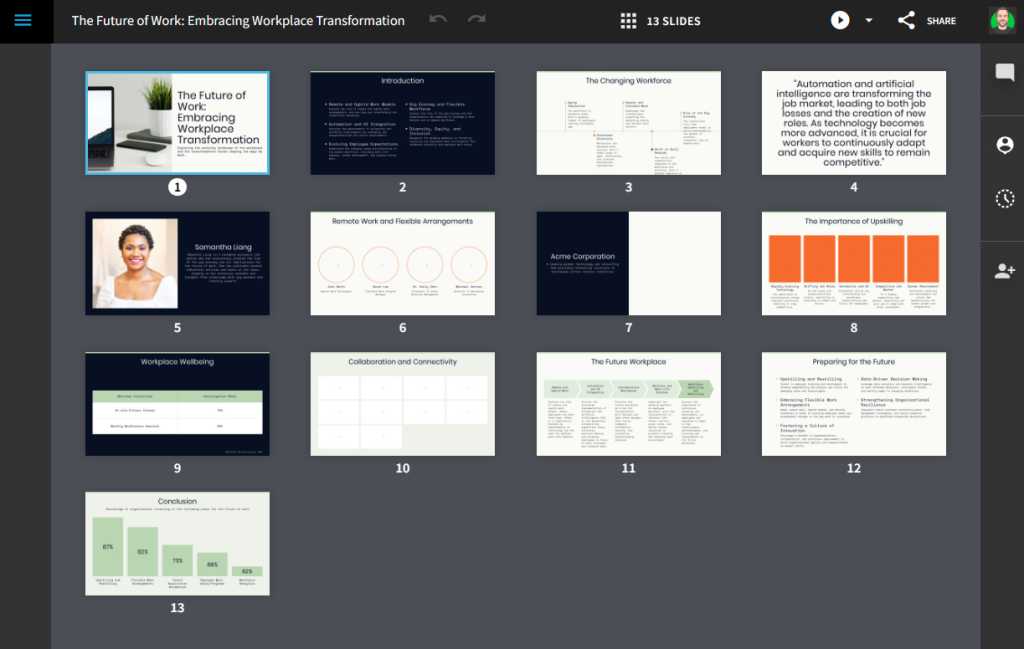
Beautiful.ai takes the typically painful process of building a presentation and makes it not only easy but also almost enjoyable. The web-based app relies on artificial intelligence to help you format and design slides and make ’em look polished and professional without any real effort — and with any specific parameters or company brand guidelines you have in mind.

You can claim as much control over the look of your slides as you want, but the best part of Beautiful.ai is how it just intelligently adapts the design for you as you go and makes it look good, no matter what you might be doing. It’s “design AI,” in a sense, and it’s shockingly impressive.

Beautiful.ai does also offer some more typical generative AI elements. You can ask the service to create a specific type of presentation for you, and it’ll not only format and design the thing but also pull in publicly available data and do all the heavy lifting. And while the result likely won’t be exactly what you need (and will require thorough fact-checking along with a fair amount of rewriting), its initial output could eliminate a lot of legwork and give you a time-saving head start for refining.
JR Raphael / IDG

All in all, it’s a recipe that changes the way you think about presentations and will absolutely spoil you for all other such software.

Beautiful.ai costs $144 a year for individuals or $480 per user per year on a collaborative team plan. It also has a $45-per-project a la carte option.

Part II: Email

3. Superhuman

If there’s one AI-oriented tool that’s really struck a chord with me, personally, it’s the newly launched Ask AI feature within the Superhuman email app. No exaggeration: My jaw literally dropped the first few times I tried it and saw what it was capable of accomplishing and how much of a difference it’d make in my own email-centric workflow.

Superhuman, if you aren’t aware, is a cross-platform app that gives you a highly optimized, efficiency-oriented interface for interacting with your email. It’s designed for people who spend tons of time in their inboxes and wade through oceans of email every day.

And its Ask AI feature fits brilliantly within that framing. While using any of the service’s desktop apps — the native Windows or Mac programs or the web-based browser version — you can simply hit the question mark key from anywhere to pull up the new Ask AI prompt.

From there, you can type out any plain-English question or command related to anything in your email. And while you could just use that as a simpler way to search and find specific messages, the real power comes from asking for actual information contained within an email or even a series of emails. It’s a massive time-saver that makes regular ol’ searching seem almost antiquated in comparison.

For example, you might ask:

  • When’s my next flight?
  • Where’s my Airbnb in San Francisco?
  • What did Val tell me about my last feature story idea?
  • How much is my last accountant invoice?
  • What’s the link for the new Computerworld WordPress site?
  • Summarize all the emails from Nvidia this month
  • Find some positive feedback about my Android Intelligence newsletter

These are all actual examples I’ve tried in my own inbox. And the results have consistently been fast, accurate, and helpful — noticeably more so than with Google’s own occasionally available Gemini-in-Gmail equivalent.

JR Raphael / IDG

The Ask AI feature is included as a part of all Superhuman subscriptions, which run $30 a month or $25 a month paid annually. The feature is in the midst of rolling out to all users on the desktop front now and is expected to expand to the service’s mobile apps sometime this summer.

Part III: Calendar

4. Dola

For all the productivity progress tech has brought us in recent years, one simple-seeming task that remains vexingly cumbersome is interacting with your calendar.

Dola does wonders for making that chore easy. In short, it’s an AI chatbot that integrates with your choice of four standard messaging platforms — WhatsApp, Telegram, Line, and Apple Messages (a.k.a. iMessage) — and then connects directly to Google Calendar, Apple Calendar, or any other calendar that supports the CalDAV protocol. (Microsoft Outlook, unfortunately, doesn’t make this easy, though you can use a third-party plugin like the favorably reviewed Caldavsynchronizer to bridge the gap.)

If you aren’t already using one of those messaging services, you can simply fire up a free account explicitly for this purpose. That’s what I did, with Telegram.

Then, once you add Dola into the service and connect it to your calendar, you can send Dola messages right within the regular chat app to accomplish everything from creating new events to canceling or moving existing appointments and also asking conversational questions about anything on your agenda.

dola creating calendar event from chat message

Dola lets you interact with your calendar via simple commands in messaging apps you’re already using.

JR Raphael / IDG

Dola can also generate all sorts of information for you and add it into your calendar events — things like lists of popular lunch spots in a specific area or even ideas for company slogans.

Dola is free to use for now, during the service’s early access phase. Its founders say there’ll eventually be some manner of paid, premium option.

Part IV: Notes and transcriptions

5. Fathom

I think we can all agree that Zoom meetings — along with Google Meet meetings, Microsoft Teams meetings, and all other kinds of virtual meetings — are objectively the worst.

And while AI can’t (yet) keep you from having to sit through those virtual torture sessions, an app called Fathom can make ’em much more tolerable.

Fathom runs quietly in the background on your computer and then automatically records, transcribes, and summarizes all of your video calls. You can search through or share its summaries and even sync ’em directly into other productivity tools such as Slack or Asana if you want.

But even if you just stick with the basics, the app lets you relax and stop worrying about taking notes or missing something important — because you know it’s listening along with you and jotting down every last word along with a simple summary of the high points.

fathom app creating action items in video meeting

Using Fathom is like having a super-focused personal assistant in all of your virtual meetings.

JR Raphael / IDG

Fathom requires a Windows or Mac computer for its local software, and it currently supports English, French, Spanish, Italian, Dutch, Portuguese, and German. You can either activate its recording manually in each meeting or opt to connect it to your Google or Microsoft calendar and allow it to automatically record any Zoom, Meet, or Teams call on your agenda.

Data is encrypted in transit and at rest, and Fathom says it does not train AI models on customer data. (See more details about the company’s security and compliance practices in its Trust Center.)

Best of all? The service is completely free to use for those core features, with absolutely no limitations around the number or length of calls it’ll record and then store. The company makes its money by selling an optional premium subscription that adds in features like advanced AI summaries, AI-generated action items and follow-up emails, systems for team management, and integrations with HubSpot, Salesforce, Close, and Zapier.

6. Whisper Web

Transcribing a video call is fine and dandy — but what about when you want to turn a regular phone call, an in-person meeting, or an already-recorded conversation into text for simple searching and future referencing?

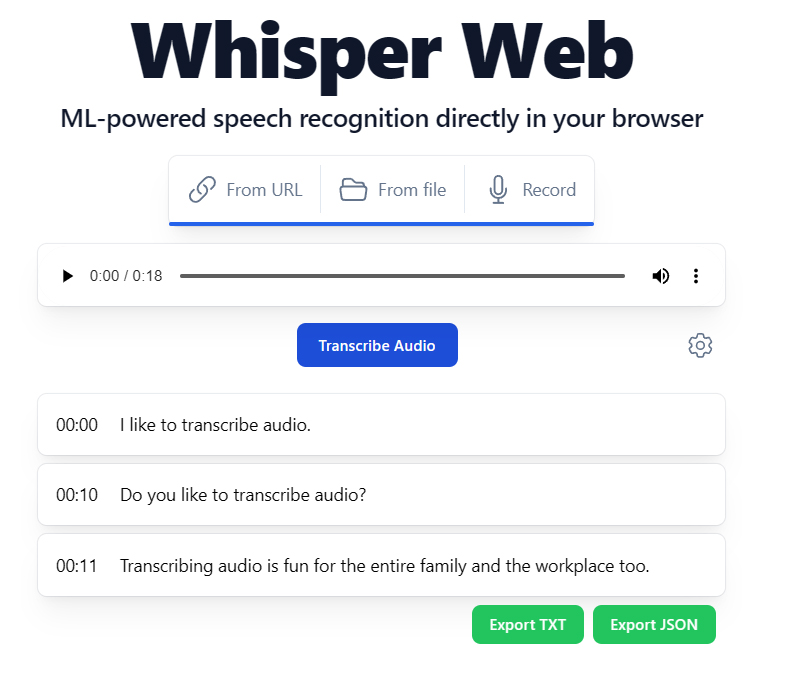
An open-source web app called Whisper Web is the answer. Whisper Web relies on OpenAI’s Whisper AI system to offer on-demand, real-time transcription right in your browser. It actually downloads the associated generative AI model and runs it right on your own device, which means your data never leaves that computer, phone, or tablet or gets sent to a remote server for processing.
whisper web transcribing audio

Whisper Web works swiftly and efficiently right on your own device — and right inside your browser.

JR Raphael / IDG

Whisper Web can record audio live from your microphone or import audio from an existing file you already have ready. Its creators say it’s trained on multilingual data and able to support on-the-fly translation from other languages into English, too. And it’s completely free to use, without the need for any accounts or sign-ins.

7. Summarize.tech

When you’ve got YouTube on your to-do list and you have neither the time nor the patience to sit and watch an entire work-related video — say, a presentation of some sort, a marathon company keynote, or maybe a boring-as-can-be board meeting — a splendid site called Summarize.tech will make your life instantly easier.

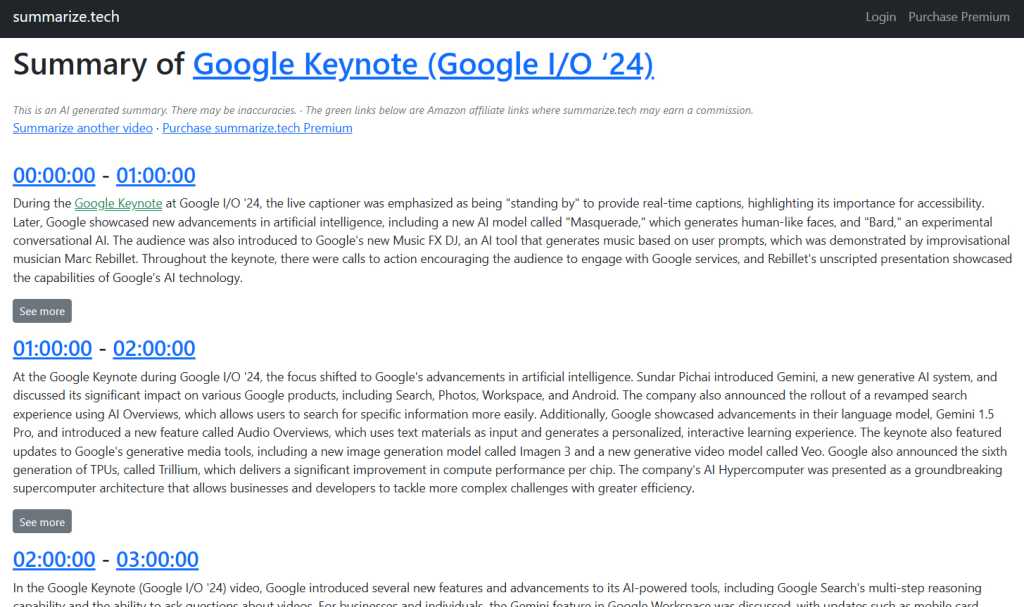
Summarize.tech takes any YouTube link you feed it and generates an on-demand transcript of the entire clip in seconds. It breaks the video down into broadly summarized sections and lets you click on any section to expand it and dive into deeper, more specific summaries within. It can even take videos in other languages, including Spanish and French, and translate and then summarize them in English for you.
JR Raphael / IDG

Summarize.tech is free for “a few” videos per day. For anything more than that, the service offers a $10-a-month premium plan that raises the limit to 200 videos a month.

8. AudioPen

Last but not least, if you take lots of notes on the go, an AI-infused app called AudioPen is a tough tool to beat.

AudioPen is kind of like a dumping ground for any and all of your passing thoughts. Whenever something occurs to you — an idea for a client proposal, a potential project for your company’s upcoming quarter, or anything else imaginable — you just hit the record button within the service and yammer away.

AudioPen stores a complete audio recording of your ramblings and also cooks up near-instant plain-text summaries of everything you say, automatically editing out filler words and repetition. Each individual recording then becomes a note in your virtual notebook. You can search through the text, translate it into another language, and interact with it in all sorts of potentially useful ways from there.

srcset=”https://b2b-contenthub.com/wp-content/uploads/2024/06/ai-productivity-apps-audiopen.jpg?quality=50&strip=all 782w, https://b2b-contenthub.com/wp-content/uploads/2024/06/ai-productivity-apps-audiopen.jpg?resize=257%2C300&quality=50&strip=all 257w, https://b2b-contenthub.com/wp-content/uploads/2024/06/ai-productivity-apps-audiopen.jpg?resize=768%2C898&quality=50&strip=all 768w, https://b2b-contenthub.com/wp-content/uploads/2024/06/ai-productivity-apps-audiopen.jpg?resize=596%2C697&quality=50&strip=all 596w, https://b2b-contenthub.com/wp-content/uploads/2024/06/ai-productivity-apps-audiopen.jpg?resize=144%2C168&quality=50&strip=all 144w, https://b2b-contenthub.com/wp-content/uploads/2024/06/ai-productivity-apps-audiopen.jpg?resize=72%2C84&quality=50&strip=all 72w, https://b2b-contenthub.com/wp-content/uploads/2024/06/ai-productivity-apps-audiopen.jpg?resize=411%2C480&quality=50&strip=all 411w, https://b2b-contenthub.com/wp-content/uploads/2024/06/ai-productivity-apps-audiopen.jpg?resize=308%2C360&quality=50&strip=all 308w, https://b2b-contenthub.com/wp-content/uploads/2024/06/ai-productivity-apps-audiopen.jpg?resize=214%2C250&quality=50&strip=all 214w” width=”782″ height=”914″ sizes=”(max-width: 782px) 100vw, 782px”>

AudioPen transforms any manner of rambling into concise, organized notes for ongoing reference.

JR Raphael / IDG

Like many of the other tools in this collection, AudioPen is completely web-based — which means it works on any device, be it a phone, tablet, or computer, and it doesn’t require any downloads or installations. You can, however, opt to install it as a progressive web app if you want a more native-feeling app-like experience.

AudioPen is free for recordings up to three minutes in length and with up to 10 stored notes at a time. An optional $99-a-year (or $159-for-two-years) premium plan eliminates those limitations and adds in a slew of extra features, including customizable styles for your summaries, summaries across multiple notes, and a simple system for sharing any notes you want to make public.

Source:: Computer World

Why (and perhaps how) Apple Intelligence will make money

Home » Archive by Category "Technology" (Page 218)

We’ll leave it to future retrospectives to show us if it turns out be a good or a bad thing, but artificial intelligence will change everything, so of course Apple is building a business around it. That shouldn’t surprise anyone.

Having likely spent billions on Private Cloud Compute, which Apple calls “the most advanced security architecture ever deployed for cloud AI compute at scale,” the company will — and does — want to recoup its investment.

But that investment may yet become the foundation of an Apple AI enterprise.

Putting the $ in AI

As I see it, while Apple has traditionally played its biggest role as a consumer-facing firm, there is a chance to think different when it comes to provisioning AI services.

Private Cloud Compute means Apple can offer generative AI tools to Apple Intelligence users, but it also gives the company a foundation from which to develop an enterprise-focused AI provisioning business.

Think AWS for private, secure, and sovereign cloud-based AI services. 

There is a need for these. Many enterprises want to do more with AI but are unable to do so due to concerns around data security and national boundaries. This is particularly true in regulated industries, where “Trusted Cloud” is a fast-rising buzzword.

Apple doesn’t need to change too much to give them what they need. It doesn’t need to go head-to-head on enterprise AI cloud services; it can simply dance to its usual tune. That’s a jive in which, once Apple has put enough of its newly announced Private Cloud Compute servers in place, it offers fee-based access to those servers to third parties who want to host their own cloud-based services.

The private cloud for the rest of us?

Privacy-conscious Apple developers will want to do this, as will security-minded enterprises running Macs, iPads, and iPhones. That fee will let them offer highly secure private AI, either for internal business or for consumer-focused plays. Of course, consumers will also be able to use these services, and there may be a fee for that.

There is, after all, likely to be a lot of money to be made in offering highly secure, private, sovereign cloud-based infrastructure for AI.

In the future, Apple will want to build on its investment in Apple Intelligence with the introduction of specific AI tools it thinks people will be prepared to pay for. I don’t think those fee-based services will be among the first tranche of Apple Intelligence tools. 

At first it makes sense to offer these services for no additional cost. It may even make sense in the longer term, given the probable spike in hardware sales Apple will enjoy as the AI PC/phone craze translates into Apple device sales — even as app sales decline to make way for AI agents.

Likely, plausible, possible

The most likely way Apple will recoup in the longer term is through offering some of its genAI models as services via iCloud, most likely within iCloud+, but also conceivably on a pay-per-use tariff.

It can also deliver services to Apple’s developer community that will enable them to offer trusted cloud-based AI experiences to iPhone, Mac, and iPad users.

But not every developer is consumer focused, which gives Apple the chance to provide support for proprietary enterprise-specific genAI apps. Given the fast pace at which enterprise users are adopting Apple products, that service may be a big win for the company, consolidating and extending upon its existing gains in enterprise tech.

The more you look at it, the clearer it becomes that Apple has lots of ways to benefit from the AI investments it is already putting into place. These opportunities are great, so it makes no sense at all for the company to ignore them.

All that said, in the EU, at least, Apple will need to convince the regulators that enabling an ecosystem for trusted cloud AI is a necessity, and while the nature and manner in which business is transacted in that space may need to be tweaked, there is real value (and real cost) in creating such an environment — particularly as the looming impact of genAI and quantum computing raises additional threats and opportunities in the computational world.

Please follow me on Mastodon, or join me in the AppleHolic’s bar & grill and Apple Discussions groups on MeWe.

Source:: Computer World

This week in Dutch tech 20/6 – 27/6

Home » Archive by Category "Technology" (Page 218)

By Linnea Ahlgren

The warm weather finally arrived! But before we begin to wind things down for the summer months, let’s catch up once more with the latest developments in Dutch tech.  Of course, in our mind, the best news from the week that passed was our own TNW Conference taking place in Zaandam, just outside of Amsterdam. (Next year we are back at one of our favourite locations at NDSM island, grab your 2-for-1 tickets now!)  This year featured some of the best keynote speakers and panellists in our 18-year history, along with rich networking opportunities and the signature festival feel that…

This story continues at The Next Web

Source:: The Next Web

EU commissioner slams Apple Intelligence delay

Home » Archive by Category "Technology" (Page 218)

If you believe European Commission Vice President Margrethe Vestager, Apple’s decision to delay introduction of its Apple Intelligence AI is a “stunning declaration” of its own anticompetitive behavior. 

Having spent the morning listening to Vestager’s comments at a Forum Europa event, I’m full of a combined sense of horror and dismay. Because while touting the need to make Europe more competitive, the regulatory chief seems also to be putting barriers in place that will have the opposite effect. 

(You can watch Vastager’s speech and Q&A here.)

Slowing down the renewable transition

Take climate change, for example. China is unique in that once it recognized the growing threat of environmental destruction, it launched a root and branch attempt to migrate to renewable fuels and attack pollution levels. 

That journey is far from over, but one result has been the creation of a strong solar panel manufacturing industry at global scale. Europe doesn’t have anything like the capacity to build renewable energy infrastructure at the same low cost, so in its haste to combat climate change, it just clobbered China with tariffs to make that lower cost renewable infrastructure more expensive to deploy — even as energy costs spiral and the planet heats up.

I see that decision as a suicide note, given the scale of the global crisis. Vestager sees it as a victory. I am unconvinced.

A place for kids

Another Vestager victory involves App Stores. “How good will it be as a parent to open an App Store and know all the apps in there are safe for children,” said Vestager during her presentation.

“How good indeed,” I respond. “It’s why I use the heavily curated, heavily moderated Apple App Store and apply parental controls on the device.” 

Of course, what Vestager is celebrating is Europe’s demand to open up the App Store under the Digital Markets Act, a move that might — as some security experts posit — make children less safe, as not every App Store will be equally secure, resilient, or trustworthy. If events on iOS echo what’s already happening on Android, we will see malware and fraud attempts amplify as criminals exploit the inherent vulnerabilities of sideloading.

But perhaps the chance for European firms to make a couple of Euros matters more. And there is strength to the argument that at Apple’s scale it does need to ensure that competitors can craft viable businesses on its platforms, in order to avoid its power becoming too great.

Pushed out of the garden

On the DMA moves against Apple, Vestager said: 

“For a company who has built a very effective walled garden vertically integrated from the device operating system to the app store, of course, it is more challenging that you need to make sure that competitors can be on your platform, because you have become a gatekeeper. If you were not the essential road for businesses to reach their consumers, of course, we would have no say. But that is exactly the point, that you are an essential route to consumers and that is why you have these obligations. And of course, they go for Apple as well as for anyone else who is a… gatekeeper.”

So now we have a series of European decisions that will make kids (and everyone else using Apple products) less safe, and help ensure the planet gets warmer for longer. What else can the EU regulators come up with?

Damned if you do, damned if you don’t

Artificial intelligence, of course, specifically Apple Intelligence — which Vestager now seems to think shows how anti-competitive Apple is because the company won’t introduce these tools in Europe until it has clarity.

When it announced plans to delay the introduction, Apple said it “was committed to collaborating with the European Commission” to enable it to introduce these features, but was concerned at some of the requirements of the DMA and how they could impact the plan.

During the talk, Vestager was asked: “On Apple, to the best of your knowledge how does Apple’s Walled Garden apply to their AI? How do you interpret their decision not to launch Apple Intelligence for the EU?”

Vestager’s response: Apple said it will not launch the new AI features, “because of the obligations that they have in Europe,” she said. “And the obligations that they have in Europe, it is to be open for competition, that is sort of the short version of the DMA.

“And I find that very interesting that they say we will now deploy AI where we are not obliged to enable competition. I think that is the most stunning, open declaration that they know 100% that this is another way of disabling competition, where they have a stronghold already.”

The struggle for privacy

When Apple announced the delayed rollout, it was quite detailed about its concerns: “Specifically, we are concerned that the interoperability requirements of the DMA could force us to compromise the integrity of our products in ways that risk user privacy and data security,” it said.  “We are committed to collaborating with the European Commission in an attempt to find a solution that would enable us to deliver these features to our EU customers without compromising their safety.”

But Vestager’s arguments, and previous mutterings on the topic of user security and privacy, seem to suggest that the “pro competition” trading bloc that gave us GDPR (ironically wrecking the economics of small website publishers when it did), isn’t going to be terribly receptive to Apple’s arguments that the highly personal data gathered on someone’s device should be protected, minimized, and not simply made available to third party AI competitors without clear user consent, protection, and oversight.  

‘This is surveillance’

As Apple CEO, Tim Cook warned six years ago, the potential for AI-driven surveillance has never been greater; that really is what is at stake in Apple’s struggles with the European Commission. 

If Europe decides in some way to force Apple to open up these features to competitors without agreeing on checks and balances to protect user data in the hopes of stimulating some great (imaginary) European unicorn digital business, then you really can kiss all hopes of digital privacy goodbye — though perhaps a smattering of billionaires will add to their bank balance.

Finally, a question: Why is it, really, that after Vestager has been in command of European competitive policy for over a decade, the bloc has become less, rather than more, relevant on the global stage? 

Please follow me on Mastodon, or join me in the AppleHolic’s bar & grill and Apple Discussions groups on MeWe.

Source:: Computer World

Download our unified communications as a service (UCaaS) enterprise buyer’s guide

Home » Archive by Category "Technology" (Page 218)

From the editors of Computerworld, this enterprise buyer’s guide helps IT staff understand what the various unified-communications-as-a-service (UCaaS) options can do for their organizations and how to choose the right solution.

Source:: Computer World

Nyobolt charges EV in under 5 mins during first test drive

Home » Archive by Category "Technology" (Page 218)

By Siôn Geschwindt

Claims of the next fastest-charging EV have become so common, they’ve almost completely lost their meaning.  But Nyobolt might just have something to brag about. The UK startup has successfully charged an EV from 10% to 80% in just four minutes and 37 seconds — just enough time to grab a coffee. Nyobolt achieved the feat at a race track in Bedford, England on Thursday, using its own specially designed electric sports car fitted with its own specially designed battery.   The Cambridge University spin-out has tinkered with the chemistry of a standard lithium-ion battery to allow it to accept more electrical…

This story continues at The Next Web

Source:: The Next Web

Box announces upgrade to Box AI, integration with GPT-4o

Home » Archive by Category "Technology" (Page 218)

Box has unveiled a new set of features in Box AI that includes an integration with GPT-4o, support for image and spreadsheet files and the Box AI for Metadata API.

In addition, the cloud content-management company announced that end user queries in Box AI for Hubs, Documents, and Notes will be unlimited for organizations that are part of its Enterprise Plus plan.

Box said the following enhancements to Box AI, a suite of capabilities launched last year that comprise of generative AI models natively integrated into the company’s Content Cloud, will take place later this year: Support for the new GPT-4o that will help the company’s AI-powered content portal Box Hubs, support for additional file types including natural language queries on image file formats, and the ability for developers to extract “key information from documents at scale” via Box AI for Metadata API.

Company CTO Ben Kus said in a news release that the “combination of AI and unstructured data represents the biggest untapped opportunity in enterprise IT.”

Thomas Randall, director of AI market research at Info-Tech Research Group, said in an email that Kus is “right that the combination of AI and unstructured data is a large opportunity. What is missing from this statement is the solution’s ability to unify such data across different siloes. While organizations stand to benefit from optical character recognition for discovering and summarizing unstructured data, the real value is also ensuring the solution can discover and unify that data from across different systems.”

If an organization uses only Box for document storage, he said, “the problem is solved. If a company is using Box, SharePoint, Dropbox, or any number of other document management systems, organizations risk producing inconsistent business decisions based on disparate data.”

In terms of the overall launch, Randall said that “there is nothing important from a technology innovation perspective. Instead, the importance lies in Box needing to launch its own generative AI function to retain competitive market share. Already, organizations are starting to leverage smaller best-of-breed solutions that offer generative AI-driven knowledgebase and document management systems alongside document information extraction and unified business intelligence. In this context, Box will likely not experience a huge drive in new customer acquisition for their generative AI features alone.”

Box said that “access to GPT-4o for products such as Box Hubs, as well as well as support for new file types including images and spreadsheets in Box AI, is planned to be available later this year and will be included in Enterprise Plus plans.”

Meanwhile, Box AI for Metadata API is now in beta for customers on Enterprise Plus plans. The company said pricing will be announced closer to general availability, along with pricing for other Box AI platform API calls and end user metadata queries in the core Box application.

Randall said that the enhancements will be a welcome addition for “Box customers and prospects already considering Box. However, Info-Tech first recommends that organizations have an AI governance strategy in place to ensure that solutions like Box AI are utilized in appropriate contexts. Organizations need to review that the data Box AI is pulling from is not inconsistent, saving the solution from hallucinating or providing incorrect responses.”

An organization’s user base, he said, “should also be trained on prompt engineering and suitable use cases. The danger is that these tools are rolled out to an untrained workforce, who then become over-reliant on generative AI and lose sight of the proper use of the solution: as an assistant only.”

Source:: Computer World

Silo and Mistral join forces in yet another European AI team-up

Home » Archive by Category "Technology" (Page 218)

By Linnea Ahlgren

If you follow European AI news, you may have read that Finland’s Silo AI and Germany’s Aleph Alpha recently established a partnership to deliver “sovereign AI.” It would seem whoever is responsible for partnerships at Silo is keeping busy, as the company today announced yet another collaboration, this time with investor darling Mistral AI. The past couple of years have seen businesses scramble to implement AI, often even before they know how they are actually going to use it, for fear of being left behind. Without proper implementation and the correct solutions and models, the promises of efficiency gains and…

This story continues at The Next Web

Source:: The Next Web

Data centres in space could be one solution to AI’s big energy problem

Home » Archive by Category "Technology" (Page 218)

By Siôn Geschwindt

As AI boosts demand for more data storage, Europe is considering sending data centres into space — and the plan is not as outlandish as it may first appear.   A 16-month, €2 million study has concluded that space-based data centres are technically, economically, and environmentally feasible.  Thales Alenia Space and Leonardo coordinated the ASCEND study, which was funded by the EU. The research also tapped expertise from the likes of Airbus, ArianeGroup, and the German Space Agency.  “Deploying data centres in space could transform the European digital landscape, offering a more eco-friendly and sovereign solution for hosting and processing data,”…

This story continues at The Next Web

Source:: The Next Web

Adobe adds Experience Manager ‘content hub’ to help find, reuse digital assets

Home » Archive by Category "Technology" (Page 218)

Adobe wants to make it easier to store, access, and “remix” marketing assets with the addition of a new content hub in Adobe Experience Manager (AEM). 

The content hub is accessible as part of AEM Assets, Adobe’s digital asset management tool, and connects with GenStudio — a separate app for managing marketing content. Unveiled last year, GenStudio is currently in trial by customers.

The content hub has several main features.

Users can search and browse for assets using smart tags that automatically provide key terms for an image. Here, AI is used to detect the contents, such as objects featured, settings (such as “outdoors”), or colors.

Adobe’s lightweight content creation and editing app Express is integrated to make changes to existing assets. Express can be opened directly from within the content hub to make quick changes, creating variations to meet different use cases. This also enables access to Firefly generative AI features in Express that Adobe said will make it even easier to change content. 

“That becomes a really awesome tool for marketers in downstream cases to quickly make a change…without having to flip through five different software [applications],” said Haresh Kumar, senior director for strategy and product marketing for Adobe Experience Manager. Any change made to an asset can then be sent for approval before being used, he said, shortening a process that could otherwise take days.  

Within the content hub, users can also manage permissions for sensitive assets and apply governance controls to ensure AI-generated content meets brand standards. The hub also contains analytics to track asset usage across an organization and understand how content is used. 

Organizations typically store 44TB of data in their digital asset management system, according to a recent IDC survey, with another 143TB scattered across individual user devices, corporate shared drives, and social media platforms, said Marci Maddox, research vice president for digital experience strategies at IDC. 

“Adobe’s Content Hub addresses this issue by promoting reuse and reducing inadvertent duplication of creative efforts,” said Maddox. “By breaking down content silos and fostering collaboration, the content hub empowers teams to work more efficiently, leverage existing assets effectively, and ultimately, deliver a more cohesive brand experience with digital media.”

The creation of digital assets is vital for an organization to tell a “personalized, contextual and relevant story to an increasingly discerning audience,” said Liz Miller, vice president and principal analyst at Constellation Research. “It can also be pure chaos. This is why features like Content Hub are a proving to be a welcome resource for customer experience teams not traditionally part of a digital asset management workflow.”

Miller said that the hub complements the broader AEM Assets application, which serves as the “big firepower solution” when it comes to digital asset management. 

“Content Hub acknowledges that not every nail requires the biggest hammer out there,” she said. “For informal engagement hubs, they need a hammer…, just a smaller, easier one to wield.”

The Content Hub is now generally available to Adobe AEM Assets customers.

More Adobe news:

Source:: Computer World

Opera unveils new version of its flagship AI browser

Home » Archive by Category "Technology" (Page 218)

By Ioanna Lykiardopoulou

Opera is unveiling today the new version of its flagship AI-centric browser, Opera One, which first launched in 2023. With Opera One, the Norwegian company became one of the early adopters of generative AI applications in web browsing. Its native chatbot, Aria, provides a set of tools such as summarisation, translation, and information search. Dubbed Opera One R2, the new version is now available for testing. It aims to expand the AI capabilities, this time focusing on the multimedia experience. Opera One R2 comes with additional features, such as image generation and image understanding, which makes it possible for users…

This story continues at The Next Web

Source:: The Next Web

OpenAI brings its ChatGPT app to all Mac users

Home » Archive by Category "Technology" (Page 218)

OpenAI has been testing its ChatGPT Mac desktop app among paying subscribers for the last few weeks. Now, it has opened its new desktop app to anyone with a Mac.

Coming so soon after Apple announced at WWDC that ChatGPT will be integrated within Siri and some apps across its platforms, the introduction must be a sign of the times. Apple’s decision to support ChatGPT and other generative AI (genAI) platforms across its ecosystem should expose millions of users to tools they might not have yet tried out.

A nice integration for Mac users

If you’ve already used ChatGPT on a browser or through other applications, you’ll be familiar with what it can accomplish. The smart chatbot can help get things done, source information, improve your work, and much more. (Though, as always, be careful of any hallucinations or errors that might crop up.)

The integration seems to be a solid combination of the ease-of-use of the Mac and the powerful tools within ChatGPT. In effect, that means the tools within the chatbot are easily available from almost anywhere on your Mac.

It is just the beginning, of course, as Apple has already promised deeper integration between its platforms and ChatGPT as an adjunct to Apple Intelligence. Announced at this month’s developer conference, Apple described plenty of uses for the technology, including in Writing tools.

What can the ChatGPT app do on a Mac?

In a series of short videos shared via OpenAI’s Twitter/X feed, the company described some of what you can achieve. On your Mac, the Chat GPT app can:

  • Respond to the well-known and familiar Option-Space shortcut to invoke a ChatGPT query.
  • Take a screenshot of a specific window or your entire screen to request feedback or advice on what is there — for example, when seeking to improve code.
  • Search past ChatGPT conversations for specific items.
  • Quickly and easily ask about anything on your computer using copy and paste.
  • And of course, as you engage in conversation, you can refine and improve the exchange to produce more useful results.

You do gain access to standard Voice Mode (so you can speak to ChatGPT). But OpenAI has already promised a new version of Voice Mode powered by GPT-4o will be introduced in the coming weeks. That version will introduce the new audio and video capabilities introduced within GPT-4o.

“Whether you want to brainstorm a new idea for your company, prepare for an interview or have a topic you’d like to discuss, tap the headphone icon in the bottom right corner of the desktop app to start a voice conversation,” the company said.

The trickle becomes a flood

While ethical, environmental, and trust issues continue to delay the kind of rapid deployment of AI aficionados had originally anticipated, there’s little doubt usage will accelerate as platforms like Apple’s weave support inside them.

For most enterprises, this demands implementation of device management systems to help protect against unapproved use of these tools, particularly around confidential data. Apple is responding to this need with device management controls in macOS to constrain use of Apple Intelligence/OpenAI. It is already possible to manage app installs on Macs using MDM systems.

The new app is available for Apple Silicon (M-series) Macs running macOS 14 or later. Similar apps are already available for iPads and iPhones, but not Windows, where they’re expected later this year. You can download the Mac app here

Please follow me on Mastodon, or join me in the AppleHolic’s bar & grill and Apple Discussions groups on MeWe.

Source:: Computer World

ChatGPT users speechless over delays

Home » Archive by Category "Technology" (Page 218)

OpenAI has delayed the release of ChatGPT’s much-anticipated new Voice Mode feature, saying it needs another month” to refine the technology before offering it to a limited group of users in an alpha test.

“We had planned to start rolling this out in alpha to a small group of ChatGPT Plus users in late June, but need one more month to reach our bar to launch,” the  company said in social media platform X.

It said it “needs one more month to reach our bar to launch.”

OpenAI was more optimistic back in May, when it showcased Voice Mode during the Spring Update event at which it launched the faster and more capable GPT-4o large language model.

“We plan to launch a new Voice Mode with these new capabilities in an alpha in the coming weeks, with early access for Plus users as we roll out more broadly,” it said then, referring to users of its $20/month ChatGPT Plus subscription service.

With the introduction of GPT-4o, OpenAI said it was able to cut the voice response to time around 320 milliseconds, from 5.4 seconds for GPT-4, creating a more natural and real-time conversational experience.

Safety and scalability concerns take center stage

OpenAI gave two reasons for the launch delay: safety and scalability.

It emphasized its commitment to responsible AI development and the need for the model to effectively “detect and refuse certain content.” This suggests concerns about potential misuse of the technology for generating harmful or offensive speech.

Scalability also appears to be a hurdle. OpenAI said it aims to ensure the feature functions smoothly for millions of users while maintaining real-time responsiveness. This requires robust infrastructure capable of handling the increased processing demands.

“Exact timelines depend on meeting our high safety and reliability bar,” the company added in the post. “We are also working on rolling out the new video and screen sharing capabilities we demoed separately, and will keep you posted on that timeline.”

More competition for ChatGPT

OpenAI’s delay in Voice Mode rollout creates an interesting scenario in the burgeoning field of AI voice capabilities.

Competitors like Anthropic, with its Claude 3.5 Sonnet model, have already showcased voice-enabled interaction during demos.

Similarly, Google’s AI research arm, DeepMind, has been making strides in voice-based AI with its LaMDA language model,.

“Anthropic has joined this year’s intense AI race with models designed to compete head-on with recent announcements from OpenAI and Google,” said Neil Shah, VP for research and partner at Counterpoint Research. “Generative AI is a blue ocean opportunity, and each company, including Anthropic and OpenAI, will need to target specific use cases and segments. Anthropic, for example, is focusing on coding, writing, and workflow optimization.”

Beyond dedicated AI models, large language models such as Bard (Google AI) and Jurassic-1 Jumbo (AI21 Labs) are also constantly evolving, with some incorporating basic functionalities for voice interaction and response generation.

Even Microsoft’s Copilot programming assistant has begun to integrate voice-based guidance for developers.

OpenAI’s iterative approach: safety first

OpenAI’s decision to prioritize safety and scalability reflects a cautious yet responsible approach. Launching a powerful voice-enabled AI requires careful consideration of potential risks and ensuring the technology can handle widespread use without compromising performance.

“As part of our iterative deployment strategy, we’ll start the alpha with a small group of users to gather feedback and expand based on what we learn,” said the company.  

This iterative approach allows them to refine the model based on real-world user interactions and mitigate potential issues before a wider release.

While the delay may disappoint some users eager to experience Voice Mode, it does show a certain caution in the face of recent criticism of OpenAI’s attitude to safety. It has been working to restore confidence in that area with a series of appointments to its new safety and security committee.

Source:: Computer World

Wondershare Filmora: Understanding the Gen Z talent shaping influencer culture

Home » Archive by Category "Technology" (Page 218)

By Briley Kenney

Wondershare Filmora’s new Gen Z in Action documentary explores the lives of influential content creators as they navigate today’s digital landscape.

Source:: Digital Trends

Wondershare Filmora: Understanding the Gen Z talent shaping influencer culture

Home » Archive by Category "Technology" (Page 218)

By Briley Kenney

Wondershare Filmora’s new Gen Z in Action documentary explores the lives of influential content creators as they navigate today’s digital landscape.

Source:: Digital Trends

Helsinki startup raises €4M for smart bed legs to outsmart bed bugs

Home » Archive by Category "Technology" (Page 218)

By Ioanna Lykiardopoulou

Helsinki-based Valpas has raised €4mn in a seed round to tackle a crawling menace: bed bugs. The bed bug outbreak in Paris last year spread apocalyptic vibes across the hotel industry and beyond. Containing the pest infestation proved and remains a challenging task. These insidious hitchhikers travel on clothes and in luggage and spread and multiply rapidly. For hotels, this doesn’t only entail the cost of extermination. It’s also a cause of revenue loss from reduced or cancelled bookings from travellers wanting to avoid sleepless nights or having to throw their luggage into the pits of hell upon return. Let…

This story continues at The Next Web

Source:: The Next Web

Best Android Emulators for iPhone and MacBook

Home » Archive by Category "Technology" (Page 218)

By Hisan Kidwai

For an app developer, releasing software on both Android and iOS is crucial, as no one…

The post Best Android Emulators for iPhone and MacBook appeared first on Fossbytes.

Source:: Fossbytes

How To Play Pokemon On PC In 2024?

Home » Archive by Category "Technology" (Page 218)

By Hisan Kidwai

It’s no secret that almost everyone over 20 first started their gaming journey with a Nintendo…

The post How To Play Pokemon On PC In 2024? appeared first on Fossbytes.

Source:: Fossbytes

REGISTER NOW FOR YOUR PASS
 
To ensure attendees get the full benefit of an intimate technology expo,
we are only offering a limited number of passes.
 
Get My Pass Now!
