


How to Make and Manage a Public Profile on Snapchat?

A Complete Guide to Faking GPS Location on Mobile Apps
Within two years, 90% of organizations will suffer a critical tech skills shortage
A growing IT skills shortage is impeding organizations from completing digitization projects and adopting new technologies including generative artificial intelligence (genAI), and it’s hitting the bottom line in several ways.
In a recent IDC Research survey of more than 800 North American IT leaders, nearly two thirds said that a lack of skills has resulted in missed revenue growth objectives, quality problems, and a decline in customer satisfaction.
And the situation is not expected to get any better. IDC predicts that by 2026, more than 90% of organizations worldwide will feel the pain of the IT skills crisis, amounting to some $5.5 trillion in losses caused by product delays, impaired competitiveness, and loss of business.
Sixty-three percent of more than 800 IT leaders surveyed said a lack of skills has delayed digital transformation initiatives, most by an average of three to 10 months.
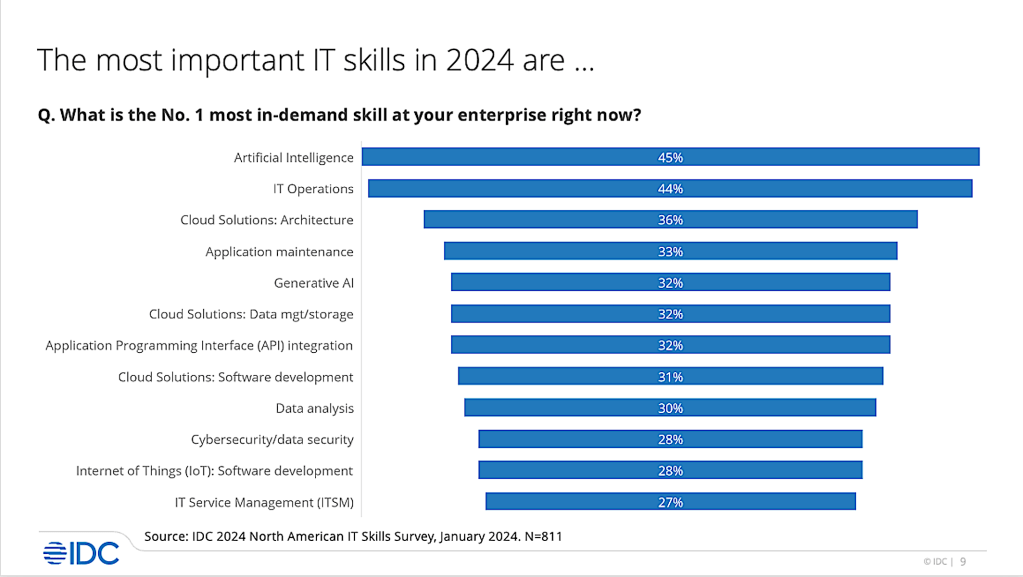
While it’s no surprise that artificial intelligence (AI) skills are currently the most in-demand skill for most enterprises, IT Operations are a close second. Additionally, a variety of cloud skills, including architecture, data management and storage, and software development, are among the ten most needed skills identified by survey respondents.
IDC
This situation is further compounded by the need for additional, non-technical skills, such as digital business skills, human skills, and leadership skills, according to Gina Smith, PhD, research director for IDC’s IT Skills for Digital Business practice.
“Getting the right people with the right skills into the right roles has never been so difficult,” Smith said in a statement. “As IT skills shortages widen and the arrival of new technology accelerates, enterprises must find creative ways to hire, train, upskill, and reskill their employees. A culture of learning is the single best way to get there.”
The IDC report Enterprise Resilience: IT Skilling Strategies, 2024 presents a framework for how enterprises can address the IT skills shortage. It includes data from IDC’s 2024 North American IT Skills Survey as well as best practices for cultivating a culture of learning in the enterprise.
With AI ‘sucking the air out of almost all non-AI investments in the whole tech world,’ companies are cutting what they believe are unnecessary jobs — and replacing them with AI-skilled workers. In the first quarter of 2024, US companies announced plans to cut 257,254 jobs, up 120% over the final quarter of 2023, according to a report by outplacement firm Challenger, Gray & Christmas. The surge in layoffs was led by the tech sector, followed by government positions.
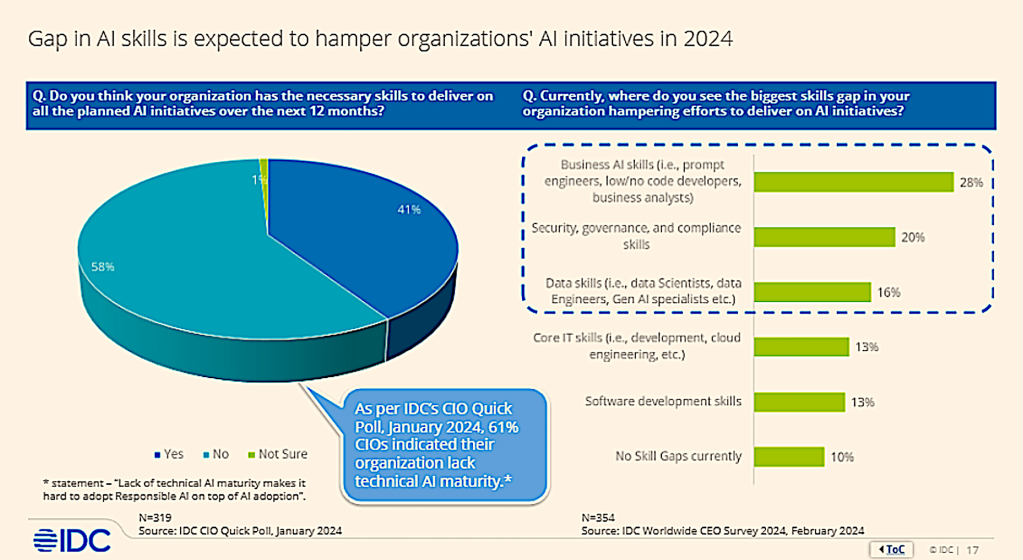
Ironically, genAI — one of the most critical skills workers lack — is likely to play a critical role in addressing skills shortages in today’s marketplace, according to a recent study by London-based Kaspersky Research. It showed that 40% of 2,000 C-level executives surveyed plan to use genAI tools such as ChatGPT to cover critical skills shortages through the automation of tasks.
“If there’s a desire to delegate critical activities and functions to genAI, it is essential that senior management first develops a deeper understanding of the data management processes, including what data can and cannot be used to train these systems,” said David Emm, Kaspersky’s principal security researcher.
IDC
A common concern among employees is that genAI will replace job positions. However, both anecdotal evidence and research has shown that like other tech advances in the past, genAI is likely to create more jobs than it replaces. And employees who are replaced by genAI are more likely to be replaced by someone who knows how to use AI as part of their skill set.
According to Forrester Research’s 2023 Generative AI Jobs Impact Forecast, the technology will influence 4.5 times more jobs than it replaces. The technology will also make up nearly 30% of the jobs that are lost to automation by 2030.
“We forecast that generative AI will replace 90,000 jobs in 2023, growing to 2.4 million by 2030,” the study said. While 2.4 million jobs replaced by genAI sounds high, Forrester notes that automation and AI overall will replace just 4.9% of US jobs by 2030. And job losses over the next two years will remain modest until questions about intellectual property rights, copyright issues, plagiarism, model refresh rates, model bias, ethics, and model response reliability are resolved, the research firm said.
The latest report from the International Monetary Fund (IMF) on the impact of genAI reads like a “best of times, worst of times” tale. The study found as much as 60% of jobs will be exposed to the effects of AI. About half of the jobs affected by AI and genAI could benefit from enhanced productivity. For the other 50%, however, genAI tools could be used to execute tasks now done by humans, which could lower labor demand, lead to lower wages, and reduce hiring.
“Many studies have predicted the likelihood that jobs will be replaced by AI,” the study said. “Yet we know that in many cases, AI is likely to complement human work.”
But that requires employees who know how best to work with AI. Rick Villars, group vice president for research firm IDC, said his analysts have seen that enterprises are “again and again” increasing budgets for genAI and other forms of AI, including building out infrastructure, services, and software platforms.
“The one thing they’re not increasing at the same level is the investment in training and upskilling their own teams,” Villars said. “That’s about the IT teams and the subject-matter experts. But it’s also just training their employees on better AI behavior and practices so they can protect their information.”
Training workers to utilize AI and big data (huge amounts of structure and unstructured information) ranks third among company skills-training priorities over the next five years, and it will be prioritized by 42% of companies, according to a survey by the World Economic Forum.
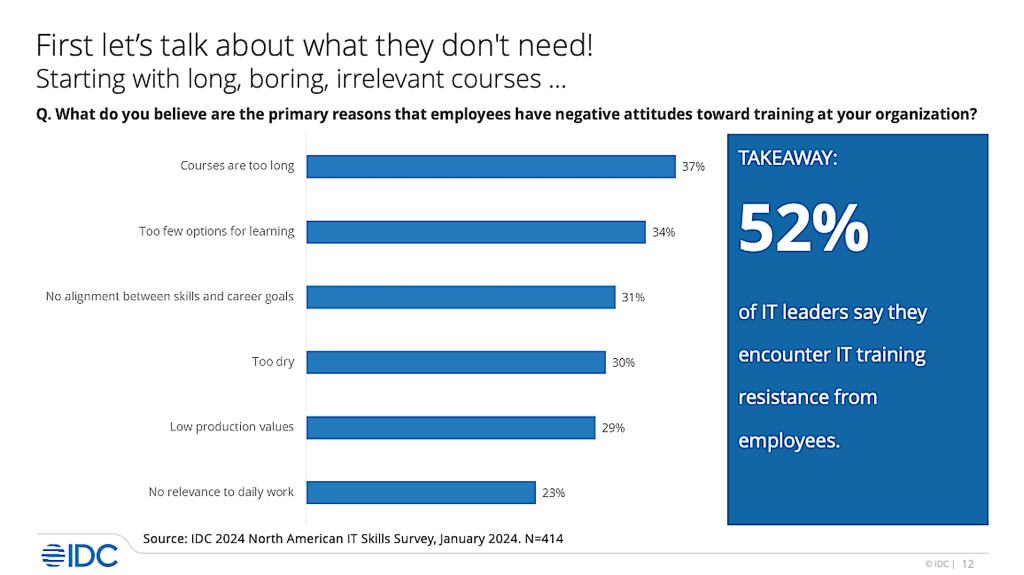
Among the challenges organizations face when trying to expand the skills of their employees is resistance to training. Employees complain that the courses are too long, the options for learning are too limited, and there isn’t enough alignment between skills and career goals, according to IDC’s survey.
IDC
To overcome these challenges, IT leaders need to employ a variety of strategies to encourage a more effective learning environment within their organization. That includes everything from classroom training to hackathons, hand-on labs, and games, quests, and mini-badges.
But fostering a positive learning environment in an organization requires more than just materials, courses, and challenges. Culture change begins at the top, and leaders need to demonstrate why learning matters to the organization.
“This can be done by aligning employee goals with business goals, promoting continuous learning throughout the employee’s journey, and creating a rewards program that recognizes process as well as performance,” IDC’s report stated. “It also requires the allocation of adequate time, money, and people resources.”
Training that engages employees also translates to “experiential learning” or hands-on training. More than eight in 10 IT executives surveyed by IDC indicated they’re either already using experiential learning techniques or plan on implementing them this year.
Nearly three out of four (70%) IDC survey respondents said they are already utilizing experiential learning methods, which includes labs, games, and hackathons. And genAI has also found its way into the current training environment, with more than half the organizations surveyed using or piloting it for IT training.
Most, but not nearly all of those surveyed said they also reward employees with project or role-based mini-credentials to encourage continued skills development.
Source:: Computer World
Google partners with Magic Leap on mixed reality development

Google has struck a partnership with Magic Leap to develop mixed reality products, the companies announced on Thursday.
The aim is to combine Magic Leap’s optics hardware IP and manufacturing expertise with Google’s own immersive technologies and developer ecosystem to collaborate on extended reality (XR) technologies, the companies said in a blog post. The term XR encompasses augmented reality, virtual reality, and mixed reality technologies.
“We look forward to bringing together Magic Leap’s leadership in optics and manufacturing with our technologies to bring a wider range of immersive experiences to market,” said Shahram Izadi, vice president and general manager of AR/XR at Google, in a press release statement. “By combining efforts, we can foster the future of the XR ecosystem with unique and innovative product offerings.”
Aside from the apparent plan for Google to focus on software and Magic Leap on optics and other hardware, there are few details on what products might result from the partnership, said Avi Greengart, lead analyst at research firm Techsponential.
“[It] could mean that Magic Leap is planning new enterprise AR glasses running Google XR software,” said Greengart, “or perhaps Google will be using Magic Leap optics in its own smart glasses, or…something else entirely.”
Computerworld asked both companies for further information but didn’t receive a response.
The partnership is an extension of a longstanding relationship between the two firms: Google led a $542 million investment in Magic Leap in 2014. (Google CEO Sundar Pichai joined the board at that time, before he reportedly stepped down in 2018.) Magic Leap has received around $4 billion in total funding to date.
The company, which initially sought to gain traction with consumers, switched its focus to enterprise sales in recent years amid reports of low sales.
While it has struggled to gain traction, Magic Leap’s optics technology is attractive to multiple companies in the AR market, said Anshel Sag, principal analyst at Moor Insights and Strategy. That includes Meta, which was reportedly in talks with Magic Leap to license its IP last year.
“Optics are not easy, and Magic Leap had to overcome a lot of challenges to deliver its unique display technology,” said Sag.
Google has developed its own AR/VR products too, notably the augmented reality headset Google Glass that launched in 2014. Like Magic Leap, Google also eventually pivoted to focus on enterprise customers after Glass failed to connect with a wider audience. Glass was discontinued last year.
Google has continued to develop various AR/VR technologies, such as Project Astra — an AI agent accessed via smart glasses, as highlighted to a demo at this year’s Google I/O. Google also struck a partnership with Samsung in 2023 with a view to develop mixed reality devices. A Google spokesperson told Reuters on Thursday that the deal with Samsung will not be affected by its collaboration with Magic Leap.
Source:: Computer World
Why Spain just banned Meta’s new EU election voting features
This week in Dutch tech
Swiss AI startup saving Swiss chocolate secures $16M
Netherlands, France, and Germany lead ‘largest ever’ botnet sting
Mistral AI Launches Codestral: AI Code Generation Across 80 Programming Languages
China unveils ambitious three-year plan to dominate AI and computing standards

China has launched an ambitious three-year plan to establish itself as a global leader in AI and computing standards. The initiative, “Action Plan for Information Standard Construction (2024-2027),” outlines a comprehensive strategy to strengthen China’s position in the ongoing tech race with the US and other nations.
The plan, spearheaded by China’s Central Cyberspace Affairs Commission, the Ministry of Industry and Information Technology, and the State Administration for Market Regulation, focuses on strengthening research and developing standards for advanced chips, computing power infrastructure, quantum technology applications, brain-computer interfaces, and AI, according to an official document published by Central Cyberspace Affairs Commission.
“The Action Plan emphasizes that information technology standards are an important part of the national standards system and an important support for high-quality development driven by information technology,” the Commission said.
“By 2027, the information technology standard working mechanism will be more sound, the layout of the information technology standard system will be more complete, a batch of high-quality information technology standards will be released, the quality of standards will be significantly improved, the implementation effect will be significantly enhanced, the role of information technology standards in leading technological innovation and driving economic and social development will be fully played, and the contribution and influence of international standards will be significantly improved,” the Commission added.
The plan places AI at the center of this mission, recognizing its role as a game-changer.
A key component of the plan is the development of “general, foundational, ethical, security and privacy standards” for large AI models and generative AI, the document added. It also aims to promote the construction of blockchain standards and the development of cross-chain interoperability and smart contract technology standards. Besides, advanced standards in important application and service fields such as cloud computing, cloud-native, distributed cloud, edge cloud, cloud-network integration, cloud applications, intelligent service, and other areas are also in focus.
The plan also intends to “promote the standardization of quantum computing, quantum communication, quantum measurement, and other key technologies, develop standards for brain-computer interfaces, enhance research on input-output, brain information decoding algorithms, brain information security, privacy protection, and related technologies and applications.”
The move is intended to address the current gaps and inefficiencies in applying standards within various government agencies.
From the information technology standards perspective, the statement said that the government faces a series of “shortcomings” such as “lack of coordination across departments and fields, and conflict of standards.”
The implementation of standards is not effective, and the phenomenon of focusing on research and development and neglecting application is still obvious; the influence of international standards work is insufficient, and the professional level, depth of participation, and quality of contribution need to be improved,” the commission added.
The action plan calls for the creation of a cohesive system that integrates computing, storage, telecommunication, and operational capabilities, reflecting the need for seamless technological integration.
China’s push for high-tech self-reliance is seen as a crucial step in transforming its economy due to mounting economic challenges and ongoing US sanctions on key technologies. Last week, the country established a massive $47 billion fund to bolster its chip industry, which is seen as a countermeasure against US efforts to limit China’s access to advanced chip technology.
China’s ambitious plan to set the global agenda for technology standards represents a significant step in the ongoing global competition for technological dominance.
Source:: Computer World
Microsoft reportedly unhappy about Apple’s OpenAI iPhone

I don’t think NBC ever considered a show called ‘Frenemies,’ but if the broadcaster had done so, the script could echo imminent tension as Apple and Microsoft both cozy up to OpenAI and ChatGPT. It’s an open relationship that doesn’t appear to be making the Windows maker happy.
According to The Information, Microsoft has been meeting with OpenAI to express some concern that Apple has reached a deal with the ChatGPT publisher to use generative AI in its products.
Microsoft Copilot’s Apple copilot
Microsoft is apprehensive because it has now sewn ChatGPT tightly within Microsoft Copilot — and the company’s entire ecosystem. Microsoft partners such as Orange Business are also in the picture, offering their own services around Copilot. Like ‘that’ episode of Friends, this ménage à trois is already a little crowded.
Disapproval comes straight from Microsoft’s C-suite. CEO Satya Nadella has reportedly met with Altman to discuss his concerns, particularly around QoS (Quality of Service) levels. Microsoft is worried that OpenAI’s servers will be unable to handle the quantity of requests generated when hundreds of millions of Apple users query ChatGPT, and that this may impact its own customers.
Microsoft has cause to feel protective. The company has pumped billions ($13b) into its Sam Altman-led AI partner, despite growing concerns about “safety and processes” at the firm. Apparently, the PC OS vendor now wants a slice of any revenue OpenAI generates as a result of the not-so-secret deal it has allegedly reached with Apple.
Zooming out
At the same time, OpenAI benefits from offering its services via all established platforms, as failing to do so could easily be construed as anti-competitive — even though Apple and Microsoft effectively compete using ChatGPT-like services, frenemy style. Microsoft fears it will lose its competitive edge, and Apple meanwhile continues to develop its own unique AI approaches, particularly around vision intelligence, spatial computing, and (of course) data privacy.
OpenAI is expected to drive some, but not all, of the AI features Apple plans to introduce — improved contextual understanding in Siri may be one of those. It is therefore quite telling that The Information claims Apple wants to make it transparent to customers when they are making use of OpenAI.
We also believe Apple is working to introduce unique AI tools that work entirely on the device, as well as server-side solutions heavily protected by iCloud privacy and encryption technologies.
Rocks in the road
There are some challenges that may yet sour the relationships Apple and Microsoft have with OpenAI, not least the frequently voiced claims that safety, security, and potential baked-in bias are not being correctly managed by the AI company.
That’s a concern professionals across the AI industry have always understood. Even Apple’s former senior director of machine learning and artificial intelligence, Carlos Guestrin, warned that poorly managed data can deliver very bad results.
This is likely why Apple, which has been working in AI far longer than so many reporters seem to believe, has been proceeding slowly and deliberately. Tech is meant to make things better, not worse. You only need to look at the impact of the dark side of social media to see what happens when strong controls are not in place.
Chef’s kiss
All that aside, Apple’s response seems to have been to work in partnership with OpenAI, and — if the report is to be believed — to put transparency guards in place so people know where responses come from.
The company may also be working to offer users a choice of genAI service providers, but nothing to that effect has been strenuously claimed.
And always in the background, Apple’s own AI teams are working on something of their own, designed to capitalize on what noted financial analyst Keith Fitz-Gerald says will be “another iPhone moment” as Apple puts AI inside the iPhone.
Microsoft, of course, is concerned that as mobile devices become smarter, its much vaunted Surface Pro recovery could fizzle out before the brand really pops. There’s a lot at stake, which is why there will be so many people glued to the next Apple keynote on June 10.
Please follow me on Mastodon, or join me in the AppleHolic’s bar & grill and Apple Discussions groups on MeWe.
Source:: Computer World
What is Snapchat Plus? Every Feature Explained For 2024
In two years, 100% of enterprise PC purchases will be AI computers

Global revenue from AI semiconductors is expected to grow to $71 billion this year, an increase of 33% over 2023, according to the latest forecast from Gartner.
By the end of 2025, AI chip industry revenue is projected to top $91.5 billion, and that revenue will continue to see double-digit growth through at least 2028, according to the report released today.
By the end of 2026, 100% of enterprise PC purchases will be AI PCs, which are computers that include a neural processing unit (NPU) enabling on-computer AI operations. Those PCs run longer, quieter, and cooler and have AI tasks running continually in the background, creating new opportunities for leveraging AI in everyday activities, according to Gartner’s report. The firm predicts that AI PC shipments will reach 22% of total PC shipments in 2024.
This year, nearly half of all AI chips revenue is expected to come from the sale of AI-enabled personal computers. By the end of this year, AI chips revenue from computer electronics is projected to total $33.4 billion, which will account for 47% of total AI semiconductors revenue, according to Gartner.
“Today, generative AI (genAI) is fueling demand for high-performance AI chips in data centers. In 2024, the value of AI accelerators used in servers, which offload data processing from microprocessors, will total $21 billion, and increase to $33 billion by 2028,” said Alan Priestley, a vice president analyst at Gartner.
This year, AI chips revenue from automotive electronics is also expected to reach $7.1 billion, and $1.8 billion from consumer electronics.
Sixty-six percent of enterprises worldwide said they would be investing in genAI over the next 18 months, according to IDC research. Among organizations indicating they will increase IT spending for genAI in 2024, infrastructure will account for 46% of the total spend.
The problem: a key piece of hardware needed to build out that AI infrastructure is in short supply. While GPUs are in high demand to run the most massive large language models (LLMs) behind genAI, the market still needs high-performance memory chips for AI apps. The market is tight for both — for now.
GPUs used for training and inference tasks on LLMs can consume vast amounts of processor cycles and be costly to use. Smaller, more industry- or business-focused models can often provide better results tailored to business needs, and they can use common x86 processors with NPUs.
“While much of the focus is on the use of high-performance GPUs for new AI workloads, the major hyperscalers (AWS, Google, Meta and Microsoft) are all investing in developing their own chips optimized for AI,” Priestley said.
While chip development is expensive, using custom-designed chips can improve operational efficiencies, reduce the costs of delivering AI-based services to users, and lower costs for users to access new AI-based applications, according to Priestley.
“As the market shifts from development to deployment we expect to see this trend continue,” Priestley said.
Last month, Intel CEO Pat Gelsinger said he sees the company’s future embedded in an AI-everywhere concept, with NPUs bolstering its new family of Intel Core Ultra processors. The chipmaker expects to ship 40 million AI PC processors in 2024 and 100 million next year.
Partly driving the uptick in AI on edge devices is the fact that the average lifespan for mobile phones is shortening, with consumers and enterprises replacing mobile phones earlier.
“This change allows device spending to achieve $688 billion during 2024, up from 2023 spending lows of $664 billion, which will represent a 3.6% growth rate,” the report stated. “The integration of genAI capabilities in premium and basic phones sustains, more than drives, this change.”
Source:: Computer World
Space tech startup Open Cosmos to build Greece’s first flagship satellite constellation
Apple promises ‘best ever’ WWDC, but will it deliver?

“WWDC is always one of my favorite moments of the year — and this one is going to be our best ever,” promises Apple CEO Tim Cook, announcing what’s to come at the company’s most important annual event, WWDC 2024.
Will the company deliver on the promise?
The event takes place mostly online with some invited on site guests. It begins with a 10am PDT keynote speech on June 10, during which Apple’s leaders will talk about what’s coming to the operating systems and share some of its plans.
There will be developer sessions, access to Apple engineers, the annual Apple Design Awards, and more. The show’s purpose is to guide developers through Apple’s old and new technologies to empower them to build applications for the platforms.
Exploring new worlds in spatial computing
This year’s focus appears to be around spatial computing and augmented reality, as implied by Apple’s social media snippet declaring, “Code new worlds.” The developer focus is also made apparent in the WWDC invitation, which says, “Coming in swiftly,” a nod to Apple’s programming language Swift. Both suggest new development tools, additional APIs, and some focus on its Vision Pro headset.
The latter suggests Apple may announce international availability dates for the product, which has only been available in the US until now. That suspicion is also raised by the inclusion of a Spatial Computing category within the Apple Design Awards for the first time.
But will Apple’s understandable desire to promote its big bet on mixed reality be enough to satisfy company watchers? I don’t think it will.
Will Apple shine a light on AI?
That’s because the tech agenda is being set by artificial intelligence, particularly generative AI.
We’ve been hearing speculation about Apple developing plans to implement genAI across its platforms for months. Most recently, it seems Apple has reached deals with OpenAI and potentially others in the space to make their AI tools available to the iPhone in some form. These will backed up by Apple’s own AI solutions, expected to be elegant tools for specific tasks capable of running on the devices themselves, along with beefier solutions that require cloud support, potentially hosted on Apple’s own M-series servers.
The company is no doubt hoping that this partnership-friendly approach to genAI will give its customers to tools they need while securing customer privacy, at least some of the time.
Data privacy and security will no doubt be part of the company’s customer promise when it comes to the application and future development of these tools. The idea that you can transcribe voice memos without risking sharing the data with the cloud will be compelling to those in regulated industries.
The cost and consequence
All the same, somewhere an industrialist is smiling over the energy use and environmental consequences of genAI solutions. Electricity grids worldwide are already feeling the strain — nearly a fifth of Ireland’s electricity is used up by data centers, and global demand is expected to increase sixfold in the next decade.
Within that context, perhaps speculation that Apple plans its own data center server processors isn’t so far-fetched, given that the company leads the industry in power-efficient computational performance on consumer chips. That plan may help secure iCloud and should also help the company meet its ambitious environmental targets. It seems reasonable to expect iCloud+ to extend what it offers users — potentially any server-based genAI features may be protected by that system.
Apple for the rest of us
But for many Apple customers, even these announcements will be seen as less consequential than any operating system news from the company. GenAI tools to make an image or find a file may be useful, but creative and productive users will want to find out how the new systems make their lives easier for routine tasks. While most people now have used genAI, they still need to do the same tasks that existed before tech threw its LLM change-agent curveball.
Those customers will be hoping for improvements in iPadOS to fully realize the power of the new processors these tablets now contain. They will want usability, security, and privacy improvements. Some will want Mail to get a lot more attention to become the kind of powerful information manager other email packages are rapidly becoming. Nearly everyone will want Siri to grow up and get reliable — particularly on HomePod.
The usual suspects
A very small coterie of users, developers, and regulators will want to learn more about Apple’s plans for opening up its platforms. The company needs to open up about this opening up at WWDC, lest it is accused of ignoring developers who choose to use these features.
I don’t think Apple can reasonably treat people prepared to pay the Core Technology Fee in a less helpful way than it does those choosing to work entirely within the Apple ecosystem. Pragmatically, Apple may not agree with the regulations that have been (or may in the future be) enacted, but those laws are here now, and it takes less energy to move forward than to roll back. There may even be new profit centers to be explored in doing so.
While it’s clear that Apple hopes to cast the spotlight on its Vision Pro range at this year’s WWDC, it really is going to be the company’s AI announcements (or lack of them) that defines the event. But don’t be too surprised if some of these announcements have spatial computing at their core.
Please follow me on Mastodon, or join me in the AppleHolic’s bar & grill and Apple Discussions groups on MeWe.
Source:: Computer World
ESA satellite launches Dutch tech into space to study climate change
Charting the ‘flight path’ for Copilot for Microsoft 365

“Copilot is so much more than a new feature within Microsoft 365. It’s about transforming the way people work.”
Whether it’s drafting a job description, sorting help desk tickets or visualizing complex data in seconds, Copilot is already creating huge value in the hands of millions of workers.
A study from the Boston Consulting Group found AI-assisted workers were 25% faster. They produced 40% better quality work. And they took on 12% more tasks than a comparable group without AI assistance.
Notably, this study used open generative AI platforms, suggesting the real impact of AI tools fully integrated with proprietary data and applications could be much higher.
It’s hard to ignore the implications for competitiveness, both on the organizational and in one’s personal career. The age of AI is here, like it or not.
Charting your “flight path” to Copilot adoption
To tap into all this potential, we recently expanded our 30-year partnership with Microsoft to better help our customers get the best value from this investment.
Taking your most important asset – proprietary data on your customers, products and markets – and having that generate truly game-changing outputs for your business takes a lot of planning and data integration capability. This needs to happen without losing sight of security and governance.
To get it right “customers should not be looking at AI or Copilot for Microsoft 365 as a simple transaction or a services project,” says Chris Woodin, Sr. Vice President – Solutions and Alliances at Softchoice.
Instead, they need to see Copilot adoption in terms of a long-term journey. That journey has multiple stages that form what we call the “flight path” for Copilot adoption. Here’s how it works.
Step 1: Plan your business case for Copilot
The first stage of the flight path is to define the vision, goals, and success criteria for using Copilot for Microsoft 365 in your organization.
We call this the “Plan” phase. Here, we look at the universe of potential use cases that might create meaningful change in value for the business and justify the case for change.
For example, you may want to use Copilot to improve the productivity and quality of your content creation, marketing, sales, or customer service teams. You might consider deploying it to IT to improve service desk ticketing, security alerts or any number of other applications. How Copilot shows up will depend on the context in which you operate today and where AI can make a difference in real productivity terms.
To help, we can support as you plan, build and win support for your business case, create a roadmap and align those with a stake in decision-making on the scope and timeline of the project.
Getting Clear on Copilot Adoption – The Business Case
Step 2: Assess your technical and organizational readiness
The next stage is to evaluate the current state of your IT environment, licensing, security posture, and organizational readiness for Copilot for Microsoft 365.
This is the “Assess” phase. In this phase, you need to make sure that existing applications, business processes, and data can be integrated effectively into Copilot. This involves a gap analysis to identify any risks, issues, or dependencies that are going to need remediation before you deploy.
For example, you may need to upgrade your Microsoft 365 subscription, update your applications, or resolve any compatibility or performance issues.
To help you gauge your readiness for Copilot, we offer a Copilot Readiness Assessment, that provides a comprehensive review of your IT environment, security posture, and Copilot requirements. This yields a detailed report with recommendations and best practices to prepare for deployment and minimize errors during the process.
The Catalyst Gets Clear on Copilot Adoption – Getting ready
Step 3: Run a pilot with select users, configure and implement
The third stage of the flight path is to configure and deploy Copilot for Microsoft 365 according to best practices and your specific requirements. This is when you integrate your custom data sources, including enterprise data, industry-specific terminology, and so on.
Then, you test and validate the functionality, performance, permissions, and security of Copilot within your IT environment with a focus on integration with enterprise data.
Note that we strongly recommend deploying Copilot as a pilot project to a select group of users first. This gives you the chance to collect valuable user feedback and course correct where needed before going organization wide.
To help you implement and pilot Copilot, we have a Copilot Implementation Service, including expert guidance and support to set up and deploy Copilot. This includes a Copilot Pilot Program with a custom plan and toolkit for deploying to an initial group of select users.
The Catalyst Gets Clear on Copilot Adoption – Implementation
Step 4: Adopt Copilot and manage the people factor
Copilot for Microsoft 365 won’t have any impact if people don’t know it’s there or why they should use it.
This means a continuous management approach to end user adoption focused on realizing the actual benefits, whether that’s increasing employee productivity or transforming the way they work with their customers.
The next phase is built to heighten awareness, engagement, and adoption of Copilot among your end users at every level. The importance of training, communication, and support to help people understand and use Copilot can’t be overstated.
You‘ll also need a clear process to monitor and collect feedback from the users on their experience and satisfaction with Copilot and apply their feedback as you go.
This is where our Copilot Adoption and Enablement Services come in. It’s meant to give you a detailed strategy and plan to drive user adoption of Copilot in your organization.
It includes a Copilot Adoption Toolkit for educating, training and supporting users on integrating Copilot into daily work as well as in cultivating an “AI-first mentality.”
Step 5: Sustain the momentum over the long term
No genuine transformation is going to be a one-and-done effort.
The final stage of the flight path involves proactive steps to keep the early momentum going. The aim is to avoid a drop-off in usage and ensure people truly integrate the tool into their work. This is more an ongoing journey than a destination.
It involves reviewing and updating the vision, goals, and success criteria as your needs and priorities evolve and as Microsoft adds new features and capabilities. You’ll want to monitor and analyze the metrics against outcomes. It may be necessary to throw in additional training, guidance, and support to the users. Remember that new hires will also need to learn the specific ways your organization uses the technology.
To help you sustain and optimize Copilot, Softchoice offers a Copilot Sustainment Service, where you can get ongoing support and guidance to maintain and enhance the performance and value of Copilot in your organization. This comes with a Copilot Sustainment Toolkit, where you’ll find the latest resources and tools to keep your users informed, engaged, and satisfied with Copilot for Microsoft 365.
The Catalyst Gets Clear on Copilot Adoption – Sustain
Ready to take off with Copilot?
You plan to adopt Copilot for Microsoft 365. Why should you trust us to help?
We know people and technology. To succeed with Copilot deployment, you’ll need to account for both and have them work in harmony.
We bring over 30 years’ experience as a Microsoft partner. This comes with a deep bench of Microsoft certified specialists who deliver thousands of Microsoft assessments and implementation projects every year.
We were our own first Copilot customer. As a member of Microsoft’s Early Access Program, we were among the first companies to use Copilot in a real-world environment.
Every Copilot needs a navigator
Source:: Computer World
India is getting in on the iPhone sideloading act

The EU has done it, the UK will probably do it, the US is considering it, and now India plans to follow suit with competition laws to regulate big technology firms, including Apple. Cupertino isn’t happy.
India’s Digital Competition Bill is a similar piece of legislation to the EU’s Digital Markets Act (DMA) that is forcing Apple to open up its ecosystem, most visibly through support for third-party app stores. India’s bill will prevent companies from promoting their own services above those of rivals, stop them from exploiting non-public user data, and also require support for third-party app purchases.
Free trade where we want it
Apple isn’t the only technology firm that’s unhappy about India’s proposals. Google and Amazon are also full of rue.
That is why a US lobby group that represents all three big firms is pushing for India’s government to rethink its proposals, warning that the draft law goes further than the DMA. “Targeted companies are likely to reduce investment in India, pass on increased prices for digital services, and reduce the range of services,” the US-India Business Council reportedly said.
(The irony that the US Chamber of Commerce should make that argument, even while the US Department of Justice struggles to bring in similar constraints on Apple and other big companies, is hard to ignore.)
A threat to Apple’s India plan?
Threat of this new law may also displease Apple’s latest manufacturing partner, Tata, which is making big investments to stake space in Apple’s India-based iPhone supply chain. The top tech company in India by market capitalization, Tata holds a senior seat on the US-India Business Council board. Most of the country’s big names have some representation on the group.
In truth, Apple’s major investments in India may spell “iPhone” to the rest of us, but to those involved in its manufacturing supply chain there, the same word spells “profit” — and they are unlikely to want that nascent business beaten quite yet.
We shall see what happens ahead, but the stage does seem set for some wrangling over the content of the new legislation. The proposals specifically target entities with a turnover in excess of $30 billion and at least 10 million local users of digital services — which basically means the big tech firms, whose market power the bill aims to constrain.
Apple wants to build business across the nation of 1.4 billion people and is well on the way to achieving that. As it seeks to reduce its reliance on China, the company is making huge efforts to build manufacturing centers and attract new users in India, so anything likely to make that work more challenging won’t be seen as ideal.
Apple CEO Tim Cook recently said the company generated record revenues in India during the March quarter, though critics may claim part of this success reflects company control of the apps market on its platforms.
Control of the means of production
Wrong or right, the extent to which big firms control the digital economy is what India’s regulations, just like those elsewhere, seek to constrain. Attempts to dent such market power is very much reflected in the work of India’s Competition Commission, which has already fined Google more than $160 million over app purchases and pre-installed apps. Apple is also undergoing investigation at this time.
The act won’t become law immediately. The government is gathering feedback before submitting the regulations for approval by parliament, and there is no set timeline for that process to take place, according to Reuters.
But for Apple this new attempt to regulate its business surely makes it far more likely that it will eventually be forced to open up its platforms to third-party apps on a global basis, rather than just in the EU. I don’t see that happening swiftly, however. The cautious approach would be for consumers, competitors, the company, and any sensible regulators to review the potential failures of such openings-up in Europe, where third-party stores are now opening at a trickle, rather than a flood.
Pending further evidence, the jury remains out on the extent to which sideloading in Europe will undermine user security and privacy, or dilute the value of the user experience.
Please follow me on Mastodon, or join me in the AppleHolic’s bar & grill and Apple Discussions groups on MeWe.
Source:: Computer World
Berlin startup Cloover bags $114M to help consumers switch to solar
EU, Australia strike critical minerals supply deal amid tech rivalry with China


